


Update #1 – Making me look like a fool!
This is a very obscure error that I came across today with a client. He was having issues where every time he would hit ENTER, his machine would type a backslash “\” and it was proving to be very unnerving. Rebooting did not help nor unplugging his external keyboard. There was only one Google Search result that showed a thread on the issue (that I could find) and there was NO resolution.
After some digging around, I THOUGHT was able to resolve it. Below are the steps that seemed to work…but the problem CAME BACK! For historical information, here are the steps that I thought worked. The UPDATED, “low tech” approach actually fixed the issue (see below the steps).
- Open your Control Panel
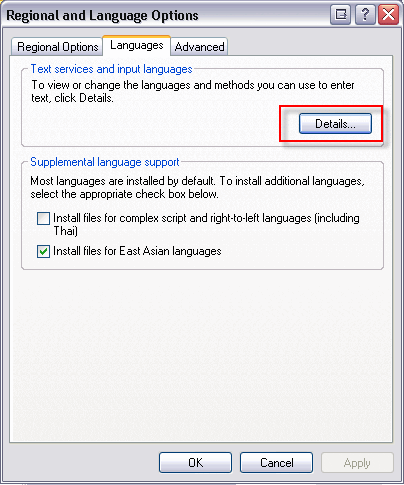
- Find the “Regional and Language Options” item and open it:

- Navigate to the “Languages” tab and click the “Details…” button:

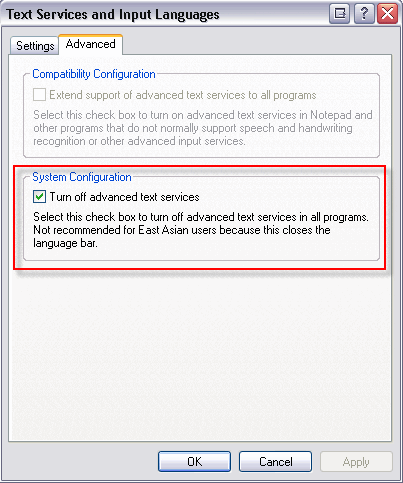
- This will launch “Text Services and Input Languages” panel. Navigate to the “Advanced” tab.
- Under “System Configuration”, if the “Turn off advanced text services” box is unchecked, recheck it (if it is already checked, I’m not sure what is going on in your case:
- Click “OK” to close “Text Services and Input Languages” and then click “OK” to close “Regional Language Options”.
- Test it out again and see if hitting Enter now does NOT show the backslash
Let me know if this works for you!
Update – so the process didn’t work! But we did find out what works. It’s pretty difficult so brace yourself:
- Unplug your keyboard.
- Turn it upside down.
- Knock it against the table
- Count all of the crumbs and crap that come tumbling out.
- Put the keyboard in front of your mouth.
- BLOW like crazy to get more crap out of it.
- Put all of the crumbs into an envelop, write a letter to your keyboard manufacturer telling them to design a crumb-less keyboard and mail it off.
- Plug the keyboard back in.
- Test it out.
Did these new updated steps work?
HTD says: Oh those pesky hidden Window’s configurations….grrrrr! STOP EATING OVER YOUR KEYBOARD!


14 comments
Bonnie
De-crumbing worked!
Michael Sheehan
Haha! Glad that worked! I keep cans of compressed air around.
liz
Thanks so much !!!The cleaning really worked!!!!!
ProtossRulz
what kind of sorcery is this!!??
karuru
The de-crumbing worked! Thanks
karuru
The de-crumbing worked! Thanks
Jeremy
Thanks – a top tip, this. It worked to cure the sudden non-return-enteringness of my Dell Inspiron 6400's keyboard
Jeremy
Thanks – a top tip, this. It worked to cure the sudden non-return-enteringness of my Dell Inspiron 6400's keyboard
Aaron S.
Solution #1 worked for me. My the enter key next to the quote was not working and the enter key on the numpad was working. I tried your first solution and checked the box and hit apply. At first, nothing changed. Then, I tried it again and UNchecked the box. That fixed it. Not sure how you figured this out or why it happens, but THANK YOU!!!
Aaron S.
Solution #1 worked for me. My the enter key next to the quote was not working and the enter key on the numpad was working. I tried your first solution and checked the box and hit apply. At first, nothing changed. Then, I tried it again and UNchecked the box. That fixed it. Not sure how you figured this out or why it happens, but THANK YOU!!!
Michael
Actually, Solution #2 works best. Try it first and then maybe solution #1 will work.
Sorry if there was any confusion.
-HTD
hightechdad
Actually, Solution #2 works best. Try it first and then maybe solution #1 will work.
Sorry if there was any confusion.
-HTD
Texmex113
The solution above works!
Texmex113
The solution above works!