

So wouldn’t it be nice to have an assistant always with you, ready to take notes and capture every word you say? No, not your teenager with a notepad (good luck with that). I’m talking about something that actually works and doesn’t roll its eyes at you. That’s the promise of AI-powered note-takers like the Plaud Note and Plaud Note Pro – devices thin enough to slip into your pocket or magnetically attach to your iPhone, smart enough to turn your rambling thoughts into organized summaries, and reliable enough that you’ll actually use them instead of scrambling for a pen that works. (*Disclosure below.)
Plaud.ai sent me both their standard Plaud Note and their newer Plaud Note Pro to test in the real world. I’ve been using these sleek AI note-takers for several weeks, testing out various “invented” scenarios around the home and on the go. Can a device barely thicker than a credit card really handle professional-grade note-taking? Does the AI transcription actually work when people talk over each other? And is the subscription model worth it, or is this just another monthly bill you’ll regret?

I’ll walk you through both devices, compare their differences, explain the Plaud platform that powers them, and help you figure out if either one makes sense for your life. I’ll also clear up the pricing confusion, because there’s hardware costs and then there’s subscription costs, and yeah, it’s a bit confusing at first.
In this review:
- The Plaud Note and Note Pro are ultra-thin AI note-takers (0.12 inches) that capture, transcribe, and summarize conversations
- Platform features include 112-language transcription, 10,000+ summary templates, and multimodal input (audio, text, images)
- The Note Pro adds an AMOLED display, automatic mode switching, extended battery life, and longer recording range
- Pricing splits into hardware costs (devices) and subscription plans (one plan covers multiple devices)
- Best for professionals, students, and anyone needing accurate meeting notes without manual transcription
Important Privacy Note: Please obtain consent from all whose voices are included before taking notes. Users are responsible for respecting privacy and complying with all local laws.
Table of Contents
See the Plaud Note and Note Pro in Action
I put together a comprehensive video review showing both the Plaud Note and Plaud Note Pro in action. You’ll see the unboxing experience, real-world demonstrations, the app interface walkthrough, and more.

The video gives you a much better sense of just how thin these AI note-takers are, how the magnetic attachment system works with your phone, and what the transcription and summary features look like in practice.
How the Plaud AI Platform Actually Works
Before we get into the individual devices, it’s important to understand what you’re actually buying into with Plaud. The Plaud Note and Note Pro are just the capture devices. What you’re really paying for is the platform that turns your audio into something useful.
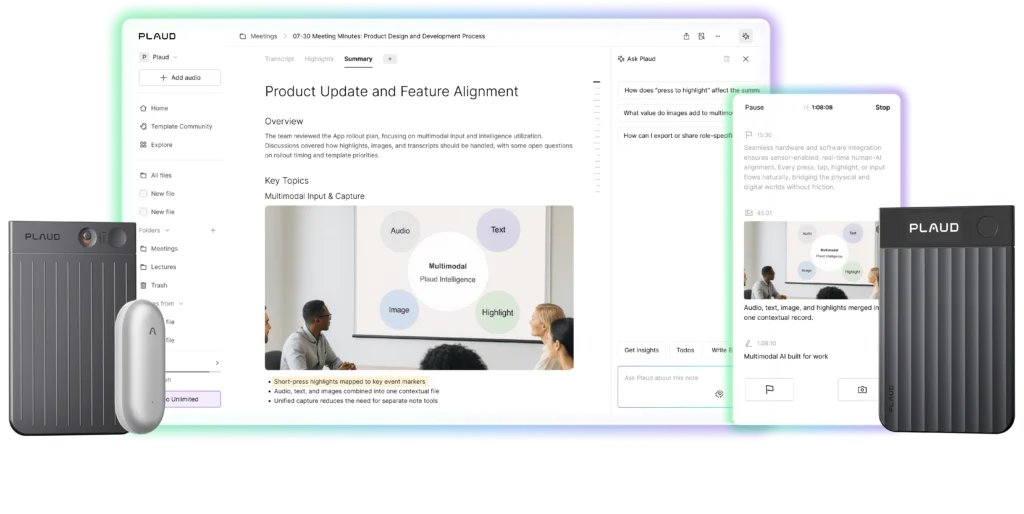
At its core, the Plaud system works in three stages. First, you capture audio using either the Note or Note Pro. Second, the audio syncs to the Plaud app on your phone where it gets transcribed using AI. Third, and this is where things get interesting, the platform AI analyzes your transcription and generates customized summaries based on templates you choose or prompts you create.
One clever feature Plaud promotes is the “Press to Highlight” button. During a conversation, you can short-press the button to flag important moments in real-time. The AI then weighs those highlighted moments more heavily when generating summaries and action items. It’s Plaud’s way of letting you guide the AI toward what actually matters rather than treating every spoken word equally.
The platform supports transcription in 112 languages, which is genuinely impressive. It actually transcribes with speaker labels, so it knows who said what in group conversations.
What really sets Plaud apart is the summary customization. You’re not stuck with generic bullet points. The platform offers over 10,000 templates designed for different industries and use cases – sales calls, medical consultations, legal meetings, and creative brainstorming sessions. You can also create your own custom prompts, which is where things get powerful.
Security matters with this kind of tool since you’re potentially recording sensitive conversations. Plaud takes this seriously with ISO 27001, GDPR, SOC II, and HIPAA compliance. Your local recordings are encrypted, and cloud files are only accessible by you. The platform only processes data when you authorize it.
One feature I found surprisingly useful is the “Ask Plaud” capability. After you’ve built up a library of recordings, you can search across all your files and ask questions. The AI pulls answers from your actual recordings and gives you references to specific moments in the audio. It becomes more valuable the longer you use it.
Now, here’s the subscription piece that trips people up. The hardware (physical devices) is one cost factor. The AI platform features – transcription, summaries, all the smart stuff – run on a subscription. But here’s the key: one subscription covers multiple devices. If you buy both the Note and the Note Pro, you don’t need two subscriptions. You get 300 minutes of transcription per month with the free starter plan, and you can upgrade to the pro or unlimited tiers if you need more.
Plaud Note Review: The Affordable Entry Point
Let’s start with the standard Plaud Note since it’s the more affordable way to get into this ecosystem and it’s got most of the same features as its fancier sibling.

This thing is shockingly thin. At 0.12 inches and 1.06 ounces, it’s basically the size and weight of a couple stacked credit cards. The aluminum build feels premium (not cheap plastic like some tech gadgets), and it actually won the iF Product Design Award in 2024. (For both Plaud Notes, I am using the included magnetic case to protect the hardware.)
The Note uses a manual toggle to switch between two modes. Slide up for phone calls, down for in-person meetings. For phone calls, you stick it to the back of your phone using the magnetic case or adhesive ring they include. It uses something called vibration conduction to capture both sides of the conversation – sounds like marketing speak, but it genuinely works.
Using it is dead simple. Press and hold the button for one second until you feel a vibration and see the red light. Press again to stop. That’s it. No menus, no complicated setup on the device itself. Everything else happens in the app after you sync.
The battery lasts a long time (approximately 30 hours of continuous use), which matched my testing. Standby time is 60 days, but it drains faster if you turn it on and off throughout the day rather than using longer sessions. Storage is 64GB, which Plaud says holds 480 hours of audio. I never came close to filling it during my testing.
The one annoyance? Proprietary magnetic charging cable instead of USB-C. I get why – keeping it ultra-thin probably required this trade-off – but it’s one more special cable to keep track of. And you know how that goes.
The microphone captures audio from 9.8 feet away, which worked fine for my testing. One-on-one conversations, on-a-walk dictation, and even home office sessions with some background noise all came through clearly enough for accurate transcription.
What did I actually use it for? Calls with a business partner on a new venture (super helpful when you need to reference what they told you two weeks ago), family conversations where we were making decisions, and quick voice notes to myself when ideas hit while I was out walking. The fact that I could just pull it out, press a button, and not think about it meant I actually used it instead of thinking “I should capture this” and never following through.
The downside: no screen means you can’t see battery or status on the device itself (or at least know what the tiny battery indicator light color stands for). Or, you need your phone nearby to know what’s happening. Not a dealbreaker, but worth knowing.
Plaud Note Pro: When You Need the Extra Features
The Plaud Note Pro takes everything about the standard Note and adds some genuinely useful improvements. It’s the same impossibly thin 0.12-inch profile and 1.06-ounce weight, so it doesn’t sacrifice portability for features.

The most obvious upgrade is the AMOLED display. It’s small, but it shows you the important stuff – recording status, battery level, and which mode you’re in. The regular Note has a red indicator light when recording, but the Pro’s display gives you more information at a glance without needing to open the app.
The Pro uses smart automatic mode switching instead of the manual toggle on the regular Note. It detects when you’re on a phone call versus recording in-person through sensors inside the device. In my testing, this worked reliably – I’d attach it to my phone for a call, and it automatically switched to phone mode. Set it on the table for a conversation, and it knew to use in-person mode. One less thing to think about.
Battery capacity jumps from 400mAh to 500mAh, which translates to 50 hours of continuous recording in endurance mode or 30 hours in enhanced mode. The Pro also supports Bluetooth 5.4 instead of 5.2, which gave me slightly better connectivity range and faster syncing to the app.
Here’s a big one: the microphone array on the Pro captures voices from up to 16.4 feet away, rather than 9.8 feet. The Pro uses four MEMS microphones plus a VPU (voice pickup unit) for better audio quality and range. In practice, this means I could record larger meeting rooms and still get clear audio for transcription. (I didn’t have a large meeting room to test this out, unfortunately.)
The Pro feels like it was designed for professionals who need powerful AI note-taking capabilities. If you’re someone who attends multiple meetings per day, conducts interviews, or needs reliable note capture in varied environments, the extra features add up.
Plaud Note vs Note Pro: Which One Should You Buy?
So you’ve got two options here, and the right choice depends entirely on how you’ll actually use the device.

The standard Plaud Note at $159 gets you into the ecosystem at a reasonable price. You get the same AI platform, same transcription quality, same summary features as the Pro. The manual mode switching isn’t a huge hassle once you get used to it. The 9.8-foot recording range works for most personal use cases.
The Plaud Note Pro at $189 is worth it if you need the extra capabilities. The automatic mode switching saves mental overhead when you’re recording frequently. The extended battery life and recording range give you confidence in professional settings.
Get the standard Plaud Note if:
- You’re new to AI note taking and want to try it without a big commitment
- Most of your note taking needs are one-on-one conversations or small groups
- Budget is a primary concern
Upgrade to the Plaud Note Pro if:
- You attend frequent meetings with multiple participants
- You want the convenience of automatic mode switching
- You need reliable performance in larger rooms or noisier environments
- You’re capturing notes multiple hours daily and need the extra battery life
One thing that surprised me: the recording quality difference between the two wasn’t as dramatic as I expected. Both produced clean enough audio for accurate transcription in typical scenarios.
Real-World Testing: How the Plaud Devices Actually Performed
I tested both devices across different scenarios to see how they performed beyond controlled conditions.
Phone call note-taking worked reliably on both devices once I figured out a testing scenario. I ended up just calling my iPhone from our home phone and testing that back and forth. The magnetic attachment holds firmly enough that I wasn’t worried about it falling off. The vibration conduction technology genuinely captures both sides of the conversation clearly.
In-person note-taking in my home office handled the one-off tests I threw at it. On my daily walks, I captured myself working through ideas out loud, even documenting thoughts while reviewing other tech products for videos. In the video, I recorded an interview I did several years ago. I simply played the video (on my About page) playing on my computer. The AI transcription handled my voice without issues, though it occasionally stumbled on technical product names until I added them to the custom vocabulary feature.
Transcription accuracy impressed me. I’d estimate 95%+ accuracy for clear speech in quiet environments. That drops to maybe 85-90% in noisier settings or with accents, but it’s still usable. The AI handles filler words and natural speech patterns well – it doesn’t transcribe every “um” and “uh,” but it doesn’t completely sanitize the conversation either.
The summary generation is where this tool really earns its keep. I created a custom prompt for product review planning that pulled out key features, problems solved, and target audience from my rambling thoughts. The AI delivered exactly what I asked for without adding flowery language. This saved me easily 30-45 minutes of manual note-taking per session.
Battery life matched the specs in my testing. The regular Note lasted through several days of moderate use (recording 1-2 hours total per day) before needing a charge. The Pro went even longer. Neither died unexpectedly during a recording.
Who Should Buy the Plaud Note or Note Pro?
These aren’t for everyone (especially those who are “anti-AI”), but they’re genuinely useful for specific groups.
- Business professionals who attend a lot of meetings will find value here. Instead of frantically taking notes while trying to participate, you can actually engage and let the Plaud handle documentation. The summary templates for sales calls and client meetings are built by people who understand those contexts.
- Students and academics can capture lectures, study group sessions, and research interviews without missing details.
- Journalists and content creators who conduct interviews will appreciate the accurate transcription and speaker labeling. Not having to transcribe hours of interview audio manually saves an enormous amount of time.
- Anyone who forgets details from conversations will benefit from having searchable transcripts of important discussions. Family decisions, medical appointments, planning sessions – having a record you can reference later beats trusting your memory.
Here’s who probably doesn’t need this: If you rarely attend meetings, don’t conduct interviews, and generally remember important details without help, the subscription cost probably isn’t justified. If you’re happy taking manual notes and that system works for you, stick with it.
Plaud Note and Note Pro Technical Specifications
Let me break down the specs for both devices so you can compare them side by side.
| Feature | Plaud Note | Plaud Note Pro |
|---|---|---|
| Dimensions | 0.12″ thin | 0.12″ thin |
| Weight | 1.06 oz (30g) | 1.06 oz (30g) |
| Display | None | AMOLED Display |
| Battery | 400mAh | 500mAh |
| Recording Time (Continuous) | 30 hours | 30 hours (Enhanced) / 50 hours (Endurance) |
| Standby Time | 60 days | 60 days |
| Storage | 64GB (~480 hours) | 64GB (~480 hours) |
| Recording Range | Up to 9.8 feet | Up to 16.4 feet |
| Microphones | MEMS microphones | 4 MEMS + 1 VPU |
| Bluetooth | BLE 5.2 | BLE 5.4 |
| Mode Switching | Manual toggle | Automatic (smart dual-mode) |
| Charging | Proprietary magnetic cable | Proprietary magnetic cable |
Both devices share the same platform features: AI transcription in 112 languages, speaker labeling, custom vocabulary support, 10,000+ summary templates, multimodal input, multidimensional summaries, mind map generation, workflow integration, and comprehensive security compliance.
What Works Well and What Could Be Better
After a couple of weeks of testing both devices, here’s my honest assessment of what works and what doesn’t.
What Works Well:
- The form factor is genuinely impressive – These devices are thin and light enough that I actually carry them, which is half the battle with productivity tools.
- Transcription accuracy exceeds expectations – I was skeptical about AI transcription working across different environments and speakers, but it pretty high accuracy in most scenarios.
- The platform features are legitimately useful – The summary templates and custom prompts aren’t gimmicks. They actually save time and deliver formatted output I can use immediately.
- One subscription for multiple devices makes sense – This pricing model is smarter than charging per device. If you want to test both models or share devices with a team member, you’re not paying double.
- Battery life delivers as promised – Both devices lasted through real-world testing without unexpected shutdowns.
What Could Be Better:
- The proprietary charging cable is annoying (Note and Pro) – In 2025, not having a traditional USB-C to USB-C feels behind the curve.
- The subscription cost adds up – The free 300 minutes per month sounds generous until you start recording regularly. If you transcribe an hour-long meeting per day, you’ll burn through that in about a week.
- No real-time transcription – You have to finish recording and sync to the app before you see the transcription. Some competing products offer live transcription as you record.
- The app is required for everything – If your phone dies or you don’t have it with you, the recordings sit on the device until you can sync them.
The bottom line: these are well-designed tools that do what they promise. The AI features work reliably enough for professional use. The hardware feels premium despite the affordable price points.
Common Questions About Plaud Note and Note Pro
-
How accurate is the transcription compared to manual note-taking?
In my testing, the AI transcription accuracy is quite high for clear speech in controlled environments. That’s good enough that I trust it for meeting notes and documentation without heavy editing. It handles technical terminology better when you add words to the custom vocabulary. Compared to manual note-taking, you get way more detail – every word spoken rather than your interpretation of key points. The trade-off is that you might get some small errors in names or specialized terms, but the overall content accuracy beats trying to write while listening.
-
Can I use the Plaud Note without paying for a subscription?
Yes, but with limitations. You get 300 minutes of transcription per month on the free starter plan, which includes basic transcription and some summary features. If you take notes occasionally – a few meetings per month, some personal notes – the free tier might cover your needs. But if you’re capturing notes daily, you’ll hit that limit quickly and need to upgrade. The hardware works without any subscription for basic audio capture and local storage, but you lose the AI transcription and summary features that make these devices special.
-
Does one subscription really cover multiple devices?
Absolutely, and this is one of the smartest parts of Plaud’s pricing model. Your subscription is tied to your account, not to a specific device. So if you own both the Note, Note Pin, and Note Pro, or share devices with a colleague, you can use one subscription across those devices. The transcription minutes pool is shared across all your recordings regardless of which device captured them.
-
How does phone call note-taking work, and is it legal?
Phone call note-taking uses vibration conduction technology – you attach the device to the back of your phone with the magnetic mount, and it captures both sides of the conversation through the phone’s vibrations. It works surprisingly well without any special app permissions. As for legality, that varies by location. Some places require two-party consent (everyone must know notes are being taken), while others only need one-party consent. Remember: please obtain consent from all whose voices are included before taking notes. Users are responsible for respecting privacy and complying with all local laws.
-
What happens if I run out of transcription minutes mid-month?
Your audio still gets saved locally on the device with full audio, but it won’t get transcribed until your minutes refresh at the start of the next month or you upgrade your plan. You can still listen to the raw audio, add text notes, and organize your content in the app. The transcription and AI summary features just wait until you have available minutes.
Plaud Note Pricing: Hardware Costs vs Subscription Plans
Let’s break down what this actually costs, because the pricing structure can be confusing if you don’t understand how it’s separated.
Hardware Costs (One-Time Purchase):
The Plaud Note starts at $159 for the basic package, which includes the device, a magnetic case, a magnetic ring for phones without MagSafe, and the proprietary charging cable. You can find it on Plaud’s website and on Amazon.
The Plaud Note Pro typically starts at $189, depending on current promotions (check the Plaud website or Amazon). It includes the same accessories as the standard Note.
Both devices are available in multiple colors (silver, black, starlight), though color options sometimes vary by retailer.
Subscription Plans (Monthly or Annual):
This is separate from the hardware and covers the AI transcription and summary features.
The Starter Plan is free and includes 300 minutes of transcription per month. This is enough for casual users who record a few meetings or conversations monthly. You get basic transcription, speaker labels, and access to summary templates.
The Pro Plan costs around $100 per year (pricing varies by region and promotions) and bumps you to 1200 minutes per month. This tier adds advanced AI features like custom prompts, priority processing, and access to premium summary templates. For someone recording an hour or two daily, this tier makes sense.
The Unlimited Plan (about $240/year) gives you unlimited transcription minutes and unlocks all platform features.
Remember: one subscription covers all devices on your account.
Value Assessment:
If you’re replacing manual note-taking or professional transcription services, the Plaud system pays for itself quickly. An hour of professional transcription can cost $60-100, so if you’re transcribing just one meeting per month, the subscription is already cheaper than alternatives.
You could, of course, manually record audio on your smartphone, then import the audio file into a transcription app, and finally use the transcription text with a GenAI service and a custom prompt. But that is a lot of work. It’s much easier to keep everything self-contained within the Plaud ecosystem.
The hardware cost is reasonable for what you’re getting – premium build quality, reliable note-taking capability, and access to the AI platform. The subscription is where you need to be honest about your usage. If you capture notes occasionally, the free tier or annual Pro plan works fine. If you’re taking notes daily for work, factor in $100-150 per year alongside the hardware cost.
Where to buy: I’d recommend purchasing directly from Plaud’s website or through Amazon. Both offer good return policies if the device doesn’t work for your needs.
Shop on HighTechDad.com
The product shown below (and related products that have been reviewed on HighTechDad) is available within the HighTechDad Shop. This review has all of the details about this particular product, and you can order it directly by clicking on the Buy button or clicking on the image/title to view more. Be sure to review other products available in the HighTechDad Shop.
-

Plaud Note Pro AI Note Taker
$189.00 -
Plaud Note AI Note Taker
$159.00


Final Verdict: Are the Plaud Note and Note Pro Worth It?
After a week or so of testing both the Plaud Note and Plaud Note Pro, I’m genuinely impressed. These devices solve a real problem – trying to participate in a conversation while simultaneously taking notes is about as effective as writing an email while your kids are telling you about their day (which is to say, not effective at all). The AI transcription is accurate enough for professional use, the summary features save time instead of creating more work, and the hardware is thin enough that you’ll carry it.

The standard Plaud Note at $159 gets you the full platform experience without breaking the bank. If you’re curious about AI note-taking but aren’t ready to go all-in, start here. The manual mode switching becomes second nature pretty quickly, and the 9.8-foot range handles most everyday situations.

The Plaud Note Pro at $189 is for people who are serious about this. The automatic mode switching means one less thing to remember (and let’s be honest, we all need less things to remember). The built-in display is surprisingly useful – no more pulling out your phone to check if you’re actually capturing anything. And that extended recording range means you can sit in the back of the conference room and still get clear notes.
What really sold me is that Plaud keeps improving the platform. The AI models get better, features get added through updates, and your note library becomes more valuable over time. It’s not a “buy it and hope it works” situation – it’s an evolving system.
Yeah, the subscription model might make you hesitate. I get it – another monthly bill. But if you’ve ever paid for professional transcription ($60-100 per hour, ouch) or spent your evening manually typing up meeting notes when you could be doing literally anything else, the math makes sense pretty fast.
My suggestion: grab the standard Plaud Note and test it with the free 300-minute plan for a month. Use it for real meetings, actual phone calls, whatever your normal routine looks like. If you hit that transcription limit and find yourself wishing you’d captured more, upgrade the plan (or just purchase more transcription minutes). If the device becomes something you reach for constantly, then consider the Pro. But if it sits in a drawer gathering dust, you’re only out $159 instead of committed to a subscription you don’t use.
Disclosure: I have a material connection because I received a sample of a product for consideration in preparing to review the product and write this content. I was/am not expected to return this item after my review period. All opinions within this article are my own and are typically not subject to editorial review from any 3rd party. Also, some of the links in the post above may be “affiliate” or “advertising” links. These may be automatically created or placed by me manually. This means if you click on the link and purchase the item (sometimes but not necessarily the product or service being reviewed), I will receive a small affiliate or advertising commission. More information can be found on my About page.
HTD says: The Plaud Note and Note Pro turn your rambling thoughts into organized notes so you can finally stop pretending you remember what was said in that meeting three days ago – just remember the subscription is where the AI magic happens, and yeah, you’ll probably lose that proprietary charging cable at least once.
HighTechDad Ratings
-
Ease-of-Use
-
Family-Friendly
-
Price Point
-
Features
Summary
The Plaud Note and Note Pro turn your rambling thoughts into organized notes so you can finally stop pretending you remember what was said in that meeting three days ago – just remember the subscription is where the AI magic happens, and yeah, you’ll probably lose that proprietary charging cable at least once. Honestly, the setup takes just a few seconds. Once you do any firmware updates, you are off and running pretty darn quickly. The audio is captured quite well on both the Plaud Note and Plaud Note Pro, and the transcription is equally fast. Then you can use the magic of AI to analyze the transcribed audio and produce a wide variety of outputs. It’s hard not to just throw the Plaud Note or Plaud Note Pro into your pocket or attach it to your smartphone and just go!
Pros
- Small form factor
- Good transcription
- Many AI templates to choose from
- Good battery life
Cons
- Proprietary charging cable
- Subscription costs could add up (after the hardware costs)
- Must use the app for everything

