


Today Apple released a beta version of Safari for both Macs and Pc’s. I was very eager to try it out especially to see if it truly is “the world’s fastest web browser.” Also intriguing is the “coverflow-esque” feature, an eye candy pleaser.
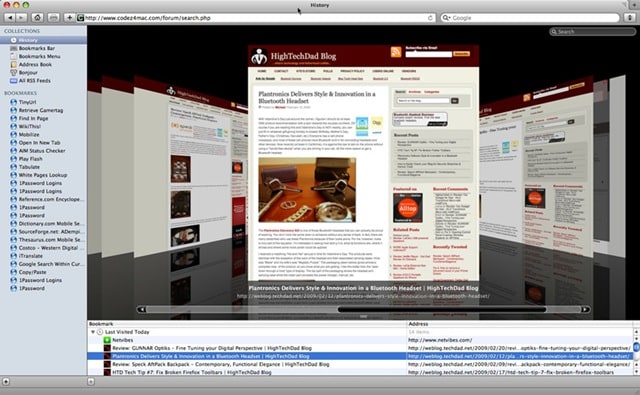
I downloaded the Mac-version beta from Apple and fired up the installer without much further thought. The install was normal and seemed to go without a hitch. Note: you are prompted to restart your Mac after the install so be sure that you save all your docs, etc.
After reboot, I clicked on the Safari icon in my doc, anticipating a glorious new, sexy version of the browser. The icon bounced…and then I got this “glorious” message instead:
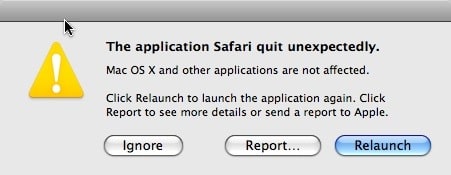
Uh, ok. What’s up with that. I ran the installer and rebooted again…still awaiting the glory. None was to be had! (Meanwhile, I successfully installed Safari on my PC…hmmm, that was a first.) Also, note that the beta version replaces the stable version of Safari 3!
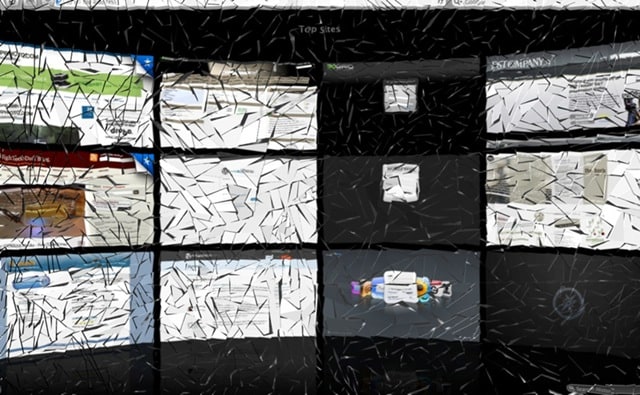
Don’t you just love my “broken” Safari 4?
So, I put on my usual troubleshooting hat and started down the list:
- Rebuilt my permissions – Didn’t fix it!
- Plug-in conflict:
- Disabled Growl via control panel – nope
- Disabled GlimmerBlocker via control panel – no luck (GlimmerBlocker is a free program that blocks banner ads in Safari for Mac)
- Checked other control panel options (When you troubleshoot, you need to think about plug-ins that interact with Safari like 1Password which I updated as well and SpeedDownload which I disabled the Safari integration) – those two were fine.
HERE is where I decided to dig in…
Safari plug-ins are located in a couple of location: [HARD DRIVE]:Library:InputManagers or sometimes [HARD DRIVE]:Users:[USER NAME]:Library:InputManagers (it might show a previous version of the OS like “InputManagers-Tiger”).
I finally came across the problematic plug-in which was in a folder called /glims/. Glims is actually a pretty slick little program that brings a bunch of nifty features to Safari like “Tabs, Thumbnails, Full Screen, Search Engines, Search Suggestions, Forms autocomplete on, Dated download folders, Type Ahead …” and a bunch of ones. I figured that I would just delete that directory and try to restart Safari. It started just fine. Problem identified and solved!
As of this writing, Glims actually has been updated and had a nice little commentary on their site “We would like to thank Apple for its last version of Safari. For a software that is all out about its stability, we were taken off guard by the last release of Safari 4.”
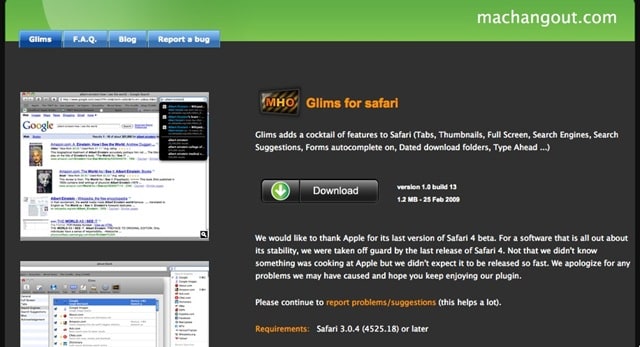
The Glims release notes also mention the fix for Safari 4 beta:
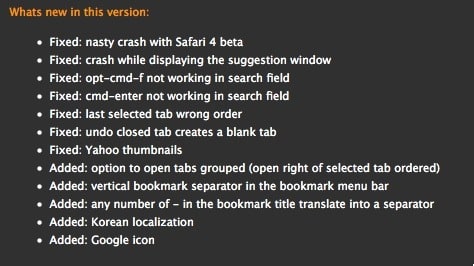
Hope this fix and troubleshooting process works for you! Please let me know one way or another, or if you encounter other incompatible plug-ins. Remember, if you run into any issues with Safari crashing unexpectedly after running an update, you should go to that “InputManagers” directory and either move or delete plug-ins that you don’t use. Simply moving the folders out of the InputManagers folder is a good process for testing.
HTD Says: don’t despair. There is always a workaround!


32 comments
Cee Bee
i began experiencing some some freezing and crashing issues a few hours into using my newly downloaded safari 4 and figured out a day or or so later that it was most likely due to a plug in called "safari stand."
the plug in has several features including thumbnail tab sidebar, view related cookies/css/images & bookmark/history searching, which i believe were conflicting with its use, as one of the main problems had to do with images not loading up completely and then freezing up altogether.
since deleting it from library/inputmanagers it's been working just fine.
thought it could help to mention it in case anyone was experiencing similar issues.
hightechdad
Thanks Cee Bee for letting us know. I think the add-o/plug-in developers are quickly updating their codes though so you should probably check back with them.
-HTD
Cee Bee
i began experiencing some some freezing and crashing issues a few hours into using my newly downloaded safari 4 and figured out a day or or so later that it was most likely due to a plug in called "safari stand."
the plug in has several features including thumbnail tab sidebar, view related cookies/css/images & bookmark/history searching, which i believe were conflicting with its use, as one of the main problems had to do with images not loading up completely and then freezing up altogether.
since deleting it from library/inputmanagers it's been working just fine.
thought it could help to mention it in case anyone was experiencing similar issues.
Cee Bee
i began experiencing some some freezing and crashing issues a few hours into using my newly downloaded safari 4 and figured out a day or or so later that it was most likely due to a plug in called "safari stand."
the plug in has several features including thumbnail tab sidebar, view related cookies/css/images & bookmark/history searching, which i believe were conflicting with its use, as one of the main problems had to do with images not loading up completely and then freezing up altogether.
since deleting it from library/inputmanagers it's been working just fine.
thought it could help to mention it in case anyone was experiencing similar issues.
hightechdad
Thanks Cee Bee for letting us know. I think the add-o/plug-in developers are quickly updating their codes though so you should probably check back with them.-HTD
hightechdad
Thanks Cee Bee for letting us know. I think the add-o/plug-in developers are quickly updating their codes though so you should probably check back with them.-HTD
Knightro
It worked! Thank you!
hightechdad
Great! Do note that Glims has been updated to work now with Safari 4 beta.
-HTD
matt
Glims now works with the Safari 4 beta.
hightechdad
Yes, thanks. I believe that I mentioned that it does in the post.
I appreciate the comment.
-HTD
Knightro
It worked! Thank you!
hightechdad
Great! Do note that Glims has been updated to work now with Safari 4 beta.-HTD
hightechdad
Great! Do note that Glims has been updated to work now with Safari 4 beta.-HTD
matt
Glims now works with the Safari 4 beta.
matt
Glims now works with the Safari 4 beta.
hightechdad
Yes, thanks. I believe that I mentioned that it does in the post.I appreciate the comment.-HTD
hightechdad
Dan,
You are definitely a wealth of information (I feel humbled). Thanks for sharing, especially the PlugSuit System Pref panel. I just installed and it is really nice (definitely recommend that).
Thanks,
HTD
hightechdad
Dan,You are definitely a wealth of information (I feel humbled). Thanks for sharing, especially the PlugSuit System Pref panel. I just installed and it is really nice (definitely recommend that).Thanks,HTD
hightechdad
Dan,You are definitely a wealth of information (I feel humbled). Thanks for sharing, especially the PlugSuit System Pref panel. I just installed and it is really nice (definitely recommend that).Thanks,HTD
hightechdad
Dan,
That is a GREAT distinction that you make here. It is too bad that developers cannot follow some standards when creating “enhancements” to the experience. My guess is, it is faster (and easer) to use the “code injection” method to avoid having to be certified by Apple, a potentially lengthy and cost-prohibitive process.
Regardless, I feel it is important for people to know where things are and how to potentially troubleshoot on their own. While in this case, Glims was the culprit, it could have been anything. We know that even Apple sometimes goofs by installing updates that break other things within their own system (QuickTime is notorious for this, right?).
I appreciate you taking the time to clarify and I don't view it as being nitpicky at all.
Thanks,
HTD
Dan Hallock
It's not a certification issue — for example, ClickToFlash, which came out recently, is a Plugin that is open source and has no ties to Apple (or Adobe for that matter).
Rather, the Plugin API doesn't actually let developers do everything they want to do (I don't know enough to make a detailed feature comparison, but I don't think plugins can modify the search box like Inquisitor does, or add menu items like DeliciousSafari does.)
Safari simply doesn't have a generalized extension architecture like Firefox has, so the developers need to hack it if they want to add/change certain types of stuff.
hightechdad
Ok, thanks for the info. As a side note, I'm going to take a look at ClickToFlash to see what it is all about.
Appreciate your comments!
-HTD
Dan Hallock
It's not a certification issue — for example, ClickToFlash, which came out recently, is a Plugin that is open source and has no ties to Apple (or Adobe for that matter).
Rather, the Plugin API doesn't actually let developers do everything they want to do (I don't know enough to make a detailed feature comparison, but I don't think plugins can modify the search box like Inquisitor does, or add menu items like DeliciousSafari does.)
Safari simply doesn't have a generalized extension architecture like Firefox does, so the developers need to hack it if they want to add/change certain types of stuff.
hightechdad
Dan,That is a GREAT distinction that you make here. It is too bad that developers cannot follow some standards when creating “enhancements” to the experience. My guess is, it is faster (and easer) to use the “code injection” method to avoid having to be certified by Apple, a potentially lengthy and cost-prohibitive process.Regardless, I feel it is important for people to know where things are and how to potentially troubleshoot on their own. While in this case, Glims was the culprit, it could have been anything. We know that even Apple sometimes goofs by installing updates that break other things within their own system (QuickTime is notorious for this, right?).I appreciate you taking the time to clarify and I don't view it as being nitpicky at all.Thanks,HTD
Dan Ridley Hallock
It's not a certification issue — for example, ClickToFlash, which came out recently, is a Plugin that is open source and has no ties to Apple (or Adobe for that matter).
Rather, the Plugin API doesn't actually let developers do everything they want to do (I don't know enough to make a detailed feature comparison, but I don't think plugins can modify the search box like Inquisitor does, or add menu items like DeliciousSafari does.)
Safari simply doesn't have a generalized extension architecture like Firefox does, so the developers need to hack it if they want to add/change certain types of stuff.
Dan Ridley Hallock
It's not a certification issue — for example, ClickToFlash, which came out recently, is a Plugin that is open source and has no ties to Apple (or Adobe for that matter).
Rather, the Plugin API doesn't actually let developers do everything they want to do (I don't know enough to make a detailed feature comparison, but I don't think plugins can modify the search box like Inquisitor does, or add menu items like DeliciousSafari does.)
Safari simply doesn't have a generalized extension architecture like Firefox does, so the developers need to hack it if they want to add/change certain types of stuff.
Dan Ridley Hallock
It's not a certification issue — for example, ClickToFlash, which came out recently, is a Plugin that is open source and has no ties to Apple (or Adobe for that matter).
Rather, the Plugin API doesn't actually let developers do everything they want to do (I don't know enough to make a detailed feature comparison, but I don't think plugins can modify the search box like Inquisitor does, or add menu items like DeliciousSafari does.)
Safari simply doesn't have a generalized extension architecture like Firefox has, so the developers need to hack it if they want to add/change certain types of stuff.
Dan Ridley Hallock
It's not a certification issue — for example, ClickToFlash, which came out recently, is a Plugin that is open source and has no ties to Apple (or Adobe for that matter).
Rather, the Plugin API doesn't actually let developers do everything they want to do (I don't know enough to make a detailed feature comparison, but I don't think plugins can modify the search box like Inquisitor does, or add menu items like DeliciousSafari does.)
Safari simply doesn't have a generalized extension architecture like Firefox has, so the developers need to hack it if they want to add/change certain types of stuff.
hightechdad
Ok, thanks for the info. As a side note, I'm going to take a look at ClickToFlash to see what it is all about.Appreciate your comments!-HTD
hightechdad
Ok, thanks for the info. As a side note, I'm going to take a look at ClickToFlash to see what it is all about.Appreciate your comments!-HTD
Dan_Hallock
If you'll allow me to be nitpicky for a moment, I think it's important to distinguish between Plugins and hacks. Plugins are stored in /Library/Internet Plug-Ins or ~/Library/Internet Plug-Ins, and include things like Flash and Flip4Mac, ClickToFlash, and the like. They're using documented APIs and are officially supported.
InputManager hacks are injecting code into Safari at runtime, and are completely unsupported by Apple. I don't have any problem with using them — indeed, I have 1Password, GreaseKit, and DeliciousSafari installed right now — but as a user and as the admin on your own system, you need to understand that these are unsupported hacks, and the potential for breakage with new Safari versions is very, very high.
Dan Ridley Hallock
If you'll allow me to be nitpicky for a moment, I think it's important to distinguish between Plugins and hacks. Plugins are stored in /Library/Internet Plug-Ins or ~/Library/Internet Plug-Ins, and include things like Flash and Flip4Mac, ClickToFlash, and the like. They're using documented APIs and are officially supported.
InputManager hacks are injecting code into Safari at runtime, and are completely unsupported by Apple. I don't have any problem with using them — indeed, I have 1Password, GreaseKit, and DeliciousSafari installed right now — but as a user and as the admin on your own system, you need to understand that these are unsupported hacks, and the potential for breakage with new Safari versions is very, very high.