

If you travel frequently, have small kids, or just like to keep an eye on things, I have a great solution for you. A few weeks ago, I came across a nice iPhone app called iCam by SKJM which allows you to set up video monitoring of up to 4 sources at a time. Sure, there are lots of webcams out there that can do things similar, but in my research, I have always found it hard to piece them all together. iCam solves this simply and nicely. And best of all, you can monitor your 4 sources all via an iPhone application that costs only $4.99. For an extra $0.99, you can add Push Notifications (which I will go into later).
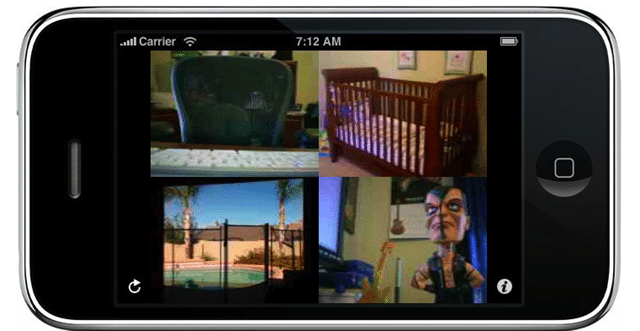
Probably the best thing about this app, apart from its extremely low price, is the fact that is works well with both Macs and PCs. The only requirements are that you have a webcam of some sort. I tested this with 2 PCs, each using different Webcam (Microsoft and Creative), and with a MacBook Pro, using the built-in iSight. To configure it, you simply download a Windows or Mac application (called the iCamSource application), get it working with the appropriate webcam, enter in a user name and password and start monitoring.
Here are the requirements for Windows:
- Windows XP or Vista with .Net 2.0 or Later
- Supports Built-In or USB Webcams as well as select MJPEG-compatible Network IP Cameras (MJPEG-compatible Network IP Camera support is currently video-only)
And the requirements for Macs:
- Mac OS X 10.4 (Tiger) or Later
- Supports Built-In, FireWire or USB Webcams and DV Cameras (DV Camera support currently requires OS X 10.5 or later) as well as select MJPEG-compatible Network IP Cameras (MJPEG-compatible Network IP Camera support is currently video-only)
Below are some screen shots of the Mac and PC applications that run.
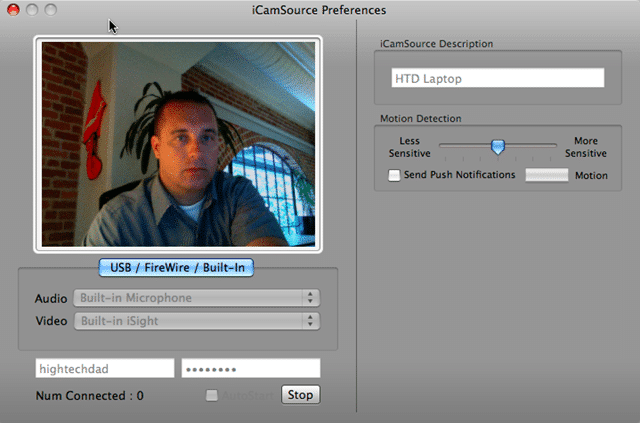
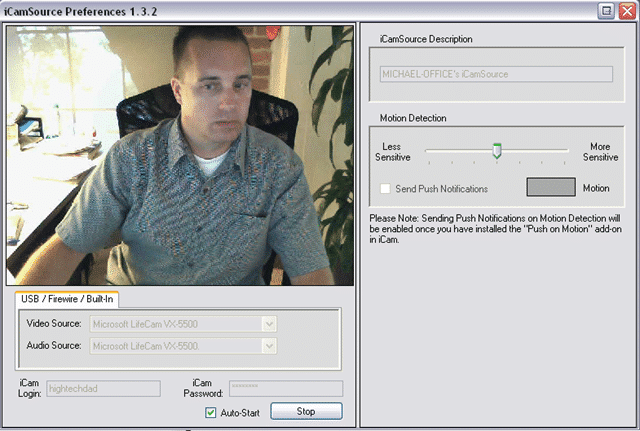
They are identical in functionality and that functionality is very straight forward. You can configure or get information on:
- Video Source – set your webcam source
- Audio Source – set your audio source to your webcam or a different microphone
- User Name – this is what you use to access your webcams (use the same one on all webcam implementations)
- Password – well, this is obvious enough, right? (use the same one on all)
- Num Connected – gives you a count of the number of users connected to your cams
- iCamSource Description – what you want to call the cam
- Motion Detection Slider – if you paid for the Push Notification option, you can set the sensitivity of the Notification trigger
- Send Push Notification – you can toggle this on and off. There is also an indicator that will flash when motion is detected so you can play with the sensitivity
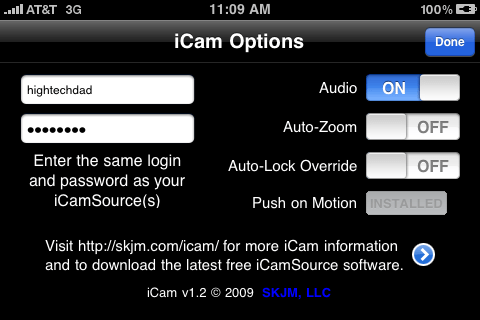
Now, on to the iPhone app, called iCam. When you launch it, you are presented with up to 4 of your webcam sources (you could potentially install many other webcam, but only 4 can be actively displayed). You can configure the application to automatically zoom if there is only one source active, as well as prevent the iPhone from locking if you are watching a cam. You can toggle audio on and off as well as purchase the Push Notification option right within the iCam app. Lastly, you enter in the user name and password that you entered in the iCamSource applications.
Below I have two webcams running from a Mac and PC at the same location. Tapping on one of the images brings up a larger picture (complete with audio as well).

From within the zoomed view, tapping on the screen brings up the ability to turn on or off the Push Notification as well as tweak the sensitivity.

Push Notification seems to work pretty well as well. Essentially, when enabled, you get a message/audio alert on your iPhone when motion is detected on one of the webcams that you have enabled to notify. This I found to be very helpful if you are not expecting any motion at that camera (e.g., you are travelling and no one is at home or at your office).
Another great thing is that this iPhone application can receive streams via WiFi, 3G and Edge. There are no restrictions. I found the quality of the video stream to be pretty good and the audio transmission is an added bonus. Also, if you don’t want to use your iPhone for monitoring, you can use iCamWeb which is a Java based application that runs in most of the latest browsers. This service is completely free (ad-supported) so if you just want to set up some monitoring and have the 4 cams display within a web browser, you can use that solution. For me, being able to have it on the iPhone AND have Push Notification is worth the money. (Note: the developer did provide me a promotional copy of iCam but I purchased the Push Notification.)
So that is how both the applications work (source and monitoring). I did have a little bit of problem with some of the PC configurations (not the Mac though). Drivers on Windows can be a bit temperamental. A couple of times on different machines the camera would not initialize. I had to update drivers and reboot a few times before it would fully work. Also, it would have been nice to have an automatic launcher when the computer boots. This is easy enough to do by putting an alias of the app in the Startup folder (Windows) or telling the app to Open at Login on a Mac. You can configure the apps to automatically start monitoring when they are launched. I have not had to use iCam’s support, but I hear that they do help out. There is also a user forum for people to get questions answered as well.
I would like to see an email notification option that captures a screenshot if motion is detected. That way you could capture the moment that something or someone passes in front of your webcam.
Bottom line, this is a very handy application to have, especially if you have a couple of webcams sitting around doing nothing. The possibilities for use are limitless. You can monitor your office while you are away (to catch people stealing your pens off your desk), have a portable video baby monitor (if you use a laptop with a webcam), watch how your toddlers are playing together (and hear them as well), keep an eye on your house when you are travelling, see how the nanny or babysitter are taking care of your kids, ensuring that your children are NOT messing around when you are away, or simply have audio and video visibility of any location where you have a computer (or even an IP-based webcam – something that I would like to try, but unfortunately I don’t have a wireless, IP-based Webcam).
HTD says: For 5 dollars (6 total if you get the Push Notification option), this is a worthwhile investment for security and knowing what is going on near your computer when you are away from it.


19 comments
Alisa Clairet
I have a macbook pro. Where can I buy the external web cams to use for this app on my iphone?
A Bruce
I found a similar app that does not require router set up. Its 247Viewer available on the app store and the website is http://www.247viewer.com
John
It has motion/sound detection which you can have notify you via a tone and vibration if either are triggered; so that you don’t have to constantly monitor the camera(s). It can also be set up to record that activity. I was able to capture a roommate on film breaking into a safe and had the video evidence for the police to make it and open and shut case!
Ribka
Is it possible to monitor from more than one iPhone?
John H Noble
Yes you can I posted below.
John H Noble
I am monitoring the same cameras on an iPhone and an Android phone. So no there wouldn’t be a problem doing so. You shouldn’t even have a problem with an IPad!
iPhone Apps
Fine information. Thanks so much, have a good day!
Motion Sensor Camera
good share thank you
hightechdad
I have been testing a Linksys IP webcam. But haven't tested it in a while. It seemed to work well when I used it.
John
Does anyone have a recommendation for IP cameras that work with Mac? I'm in a Mac only environment. Thanks!
andylock
Web casting, or broadcasting over the internet, is a media file (audio-video mostly) distributed over the internet using streaming media technology. Streaming implies media played as a continuous stream and received real time by the browser (end user). Streaming technology enables a single content source to be distributed to many simultaneous viewers. Streaming video bandwidth is typically calculated in gigabytes of data transferred. It is important to estimate how many viewers you can reach, for example in a live webcast, given your bandwidth constraints or conversely, if you are expecting a certain audience size, what bandwidth resources you need to deploy.
andylock
Web casting, or broadcasting over the internet, is a media file (audio-video mostly) distributed over the internet using streaming media technology. Streaming implies media played as a continuous stream and received real time by the browser (end user). Streaming technology enables a single content source to be distributed to many simultaneous viewers. Streaming video bandwidth is typically calculated in gigabytes of data transferred. It is important to estimate how many viewers you can reach, for example in a live webcast, given your bandwidth constraints or conversely, if you are expecting a certain audience size, what bandwidth resources you need to deploy.
hightechdad
You need to have a PC or Mac on for the streaming app to reside. So,
you can have a Webcam connected to a Mac or PC and then stream from
there. Or, you can use an IP Webcam (not attached to a PC) but you
still need a PC or Mac connected. I believe they are working on
enhancing the IP-based Webcam but I'm not sure what the new
functionality would be.
Hope that helps!
dlee
So this app doesn't need the home Mac to be on? Just a active router? THANKS
hightechdad
You can do that but if you child will know that it is on and it is
possible to turn off the software. It's not a spying device, it's a
monitoring one. If you tell them, it is easy enough to set it up to
automatically launch when they log in.
bill
I'd like to be able to use this iPhone app to watch my kid as she uses her macbook pro at school. Is it possible to configure it that way?
hightechdad
I'm not sure actually. I'm trying to reach out to the Cisco/Linksys
folks to try theirs. It looks quite good for the money and features
actually.
satishunni56
any recommendation for a good wireless web cam?
mr570
Great review of this app. I have had my eye on this app for a while, and with a new born on the way, I just might set this up.
Thanks!