


A few weeks ago, a friend pointed out a new site to me called MotherApp. They claimed to take the pain and time lag out of creating applications for mobile devices.
![HTD_app_iTunes_thumb[1]](https://www.hightechdad.com/wp-content/uploads/2009/12/HTD_app_iTunes_thumb1.png)
The MotherApp site lists three different services that they provide:
- Client Services – where they claim to be able to develop custom applications in as little as 9 weeks
- MotherApp BlogEngine – which allows you to share your blog and Twitter streams via a mobile app
- MotherApp Engine – a developer tool that lets you use HTML instead of SDKs to create mobile apps
The offering that immediately jumped out at me was the “MotherApp BlogEngine” so I filled out the form with the required info (which was basically my email address and blog URL) and didn’t think much more of it. (I tend to fill out lots of forms and sign up for many services just to see what they are about.) A day later, I received an email from the MotherApp team asking me for a picture of me or image, a description of my blog and my Twitter account (@hightechdad).

After sending my logo, blog description and Twitter information, I figured that would be the end of things and I would never hear anything again. How wrong I was! The next day, not only did I get an email with some questions I had asked answered, I also was informed that the app had already been created and was uploaded to the Apple App Store and was waiting approval. WOW!
So with anticipation, I kept searching the iTunes store for “MotherApp” to see if it had showed up. Each day, the search results produced more and more applications created by MotherApp including ones for: Guy Kawasaki, Chris Brogan, Tim Ferriss, and others. But mine wasn’t there.
Finally, one day it did show up but it happened to coincide with some madness that was occurring on my blog. I had recently survived a crazy Giveaway which had a Denial of Service attack to it resulting in me having to move my site from one hosting provider over to the GoGrid Cloud (where I work). Unfortunately, because of some DDoS protection that I had enabled, something was causing issues with my RSS feed (a critical component to the MotherApp application) and they pulled my app (temporarily) from iTunes until I resolved it. Now, the feed is stable (fingers crossed) and my app is back on iTunes. You can download it now by clicking on this link which will launch iTunes.
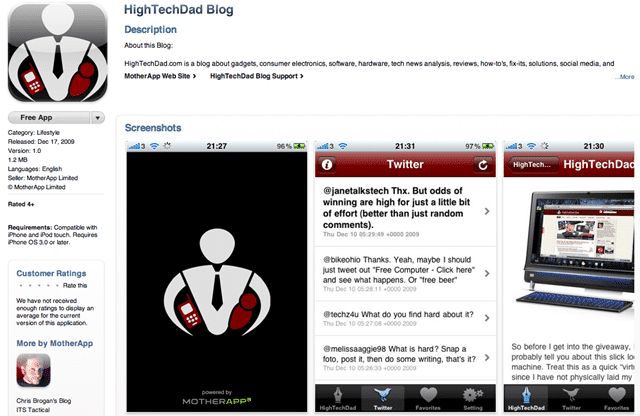
A Review of the Application
The iPhone application itself is fairly simple. There are just a few components that make it up: Latest blog articles, my latest Twitter stream, a Favorites section and settings.
The Blog articles work pretty well. It seems to be based off of my RSS feed (with lots of the extra stuff stripped out of there including advertising). The Articles section looks like this:
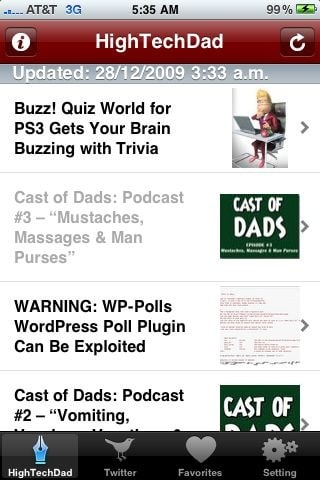
You see the main image of the post (I believe it is the first image that appears in the RSS feed). Currently, mine shows the 6 latest articles. When you click through an article, you get the full post, complete with any media that is in your post:

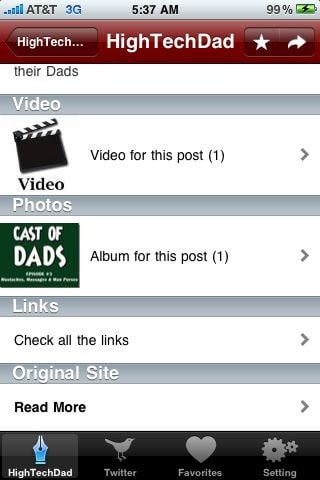
The Star at the top allows you to “favorite” an article for later reading. Also, it is important to note that you can read the articles offline (no internet connection required). The only time you need an internet connection is when you want to download the latest articles or share an article via Twitter, Facebook or email (that is what the arrow is for). The Settings button is for configuring your Facebook and Twitter account sharing. Also, within each article are a list of “links” that appear within a particular post (note that links do not appear in the article when reading it). Clicking on one of them launches those pages within the application itself. Similarly, any images that appear within a post are shown within the “Album” section of an article.
In articles that have other type of content (e.g., shown below is the post about my new “Cast of Dads” podcast), you can click on that media. For example, clicking on “Video for this post” launches the QuickTime player for the MP3 podcast. When you are finished listening, you can go back to the application.
There is also the ability to read my “truly wise” Twitter stream which pulls my latest tweets.
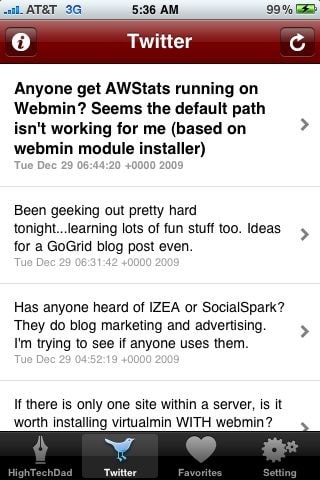
Overall, I’m pretty impressed with the application, especially on how quickly it was created AND the fact that MotherApp handles the submission and support of the application. I wish that there were some more configuration options available like how many current posts to show (based on the number available in the RSS feed) as well as a date stamp for the articles. It would be great as well if comments could be added to the blog posts but I understand that may be difficult since so many bloggers use different commenting plug-ins or services (supposedly this feature is coming soon).
Frequently Asked Questions
Obviously, when I started going through this process, I had a lot of questions. So, here are some things that I learned from asking the MotherApp team. (Do note, they have a good FAQ section on their site.) I have summarized the questions into bullet points:
- The application creation process takes only a day or two to create and submit to Apple.
- The Apple approval process can take up to 3 weeks.
- You do have the ability to update the description of your site but I believe you have to run it through MotherApp since they manage the app.
- There are two revenue models that MotherApp uses: Ad-supported (Free with a 50/50 revenue share) and Ad-free ($99/year)
- The content creator “owns” the app (that is to say, I “own” my app). MotherApp says that they are just the “enabler.”
- BlogEngine currently only works on iPhone apps but Android, Blackberry, Windows Mobile and Symbian are coming in 2010.
- Supposedly you can get access to the stats but I haven’t tried that yet.
Summary
For those people who have fairly good traffic on their blog, you might want to fill out the form on the MotherApp site to see if they will build one for you. You only need to enter your email and blog URL and any notes about your site that you might want to include. Obviously, since this just launched for me, I don’t have any end user feedback. I hope that you can either leave a comment on this post or within iTunes as well (give it a good rating!). This is a great way to extend your brand and content beyond just a web browser as well as make your content available offline.
Again, the direct iTunes link for my HighTechDad application is here.
HTD says: I hope that you like my application and the content therein! Please let me know!


1 comment
Kristile L. Cain
This is pretty dang cool. I will be installing your app and checking out MotherApp. :)