Open Source

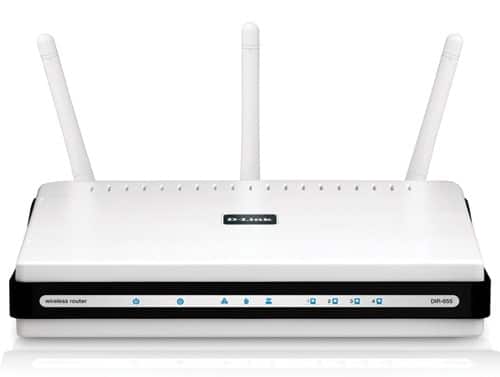
Post image for D-Link DIR-655 Xtreme N Gigabit Wireless Router – Advanced Configurations & Stability at an Attractive Price

I love WiFi routers. I’m not sure why. But I have about 3 or 4 of them running in my house. Some are providing WiFi networks for all of the people in the family and the other connected devices as well, while others are set up as back-up or private, and only used occasionally. I probably have a lot of signal overlap and could optimize my network a bit better, but for now, I like having diversity and choice.

There is a pecking order to my WiFi routers. The #1 position is the one that has the main SSID and is the one that all of the devices connected to it (including other routers) as well as our DSL modem. The router that stays in this position the longest is typically the one that I like the best or the most stable one. What I mean by stable is that it doesn’t need to be rebooted frequently because it has run out of memory or has locked up or is not providing a reliable WiFi service.

DIR-655_front

Another thing that I like doing is putting on open source firmware onto my routers. The two open source firmware projects that I have used are Tomato and DD-WRT. Not all routers support the flashing of 3rd party firmware. But typically those project have a listing of supported hardware so you need to dig around their sites to find out if your router is supported (and sometimes there are difference even between versions of the same model). For example, I picked up a Linksys router at a garage sale for $5 and while I was there, I was looking up the version and model on the DD-WRT website to see what versions of firmware were supported.) Why would you replace the stock firmware anyway? Simply because you need more features, configuration or capabilities from the router.

WiFi routers themselves are pretty dumb. It’s the firmware (software) that makes them smarter. Another reason for replacing the stock firmware is to make the router simply run better and be more stable. I have flashed the firmware of just about all of my Linksys routers as well as my Belkin routers. I wanted more stability, better performance and more configuration options.

[click to continue…]

{ 11 comments }

I’m sure that many of you have heard of the Find My iPhone service for MobileMe that helps you locate missing iPhones or iPads. Or the equivalent on Windows Mobile phones called My Phone. And I’m sure you know about LoJack that helps you locate stolen cars. LoJack also offers a service for computers as well, for a price. There are other offerings that help you locate lost or stolen laptops out there too, but most of them are expensive. For me, it’s a bit easier to justify spending a little bit on a service like MobileMe (which does a lot more than just the “Find My iPhone” service and is good for multiple devices), and it is a lot easier to lose or have a phone stolen. Laptops are a little trickier in that they are bigger and don’t usually have built-in GPS’s or location services.

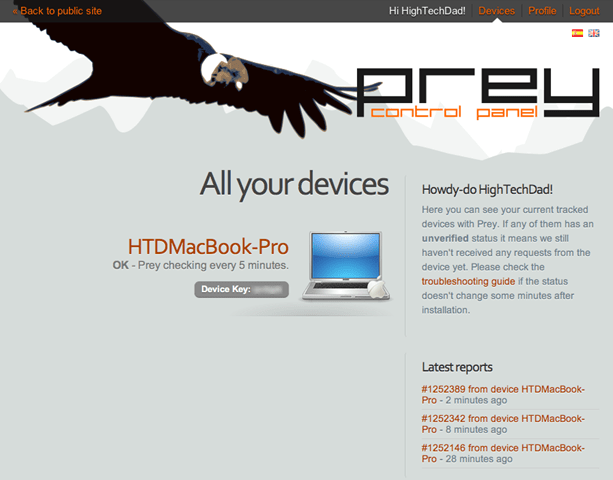
But today I came across (actually using StumbleUpon) an Open Source project called “Prey” which has taken the difficulty of setting up and configuring a behind-the-scenes service that lets you locate you lost or stolen laptop. The service is FREE and works on multiple platforms (Linux, Windows and MacOS).

Prey_control_panel

Some of the highlights of the features are:

  • Geo-location Aware – the Prey developers have created a way to triangulate the location of your stolen or lost laptop (assuming it’s on, of course, and connected to the internet) based on publically indexed WiFi hotspots.
  • Wifi Autoconnect – this innovative feature detects if your laptop is connected to an active network connection and if it isn’t, it will try to connect to a nearby open WiFi access point.
  • Lightweight – the developers coded the Prey application in bash which, according to their site, means that it has virtually no dependencies.
  • Modular – Prey has a variety of different functions or modules. Read on to find out some of the different items that can be configured.
  • Strong Reporting – you can configure the types of reports you get from your laptop like running programs, recently modified files, active connections, screenshots of the active desktop, and even a webcam capture.
  • Alerting – you can configure Prey to pop up messages on your laptops screen, change your desktop picture (Mac/Linux), send out an alarm sound or speak an alert.
  • Auto Updating – once you install Prey, you can forget about it. It will update itself (if you want it to) to the latest version automatically.

[click to continue…]

{ 0 comments }

A fairly significant update to WordPress is slotted to be released today (09.24.07) with some interesting new features, including:

  • Plugin Update Notification
  • Tags!
  • Improved Post and Draft Management
  • Pending Review
  • Advanced Visual Editor Buttons
  • Pretty URLs
  • Updated Default Blogroll
  • Other “advanced user” stuff

More details on the features/changes are below:

Plugin Update Notification

Not only are you now notified about new versions of WordPress, you now get notified of new versions of plugins. The only caveat is that the plugins must be hosted on WordPress.org. I personally wonder how this will work in conjunction with a GREAT plugin that I use called “PlugInstaller” which lets you check for new version, activate/deactivate but also fully DELETE a plugin from your plugin directory. This is a great way to easily clean up your old plugins.

[click to continue…]

{ 0 comments }

Well it has been a long night but a few beers later, I think that I have some things that I like. CSS has never been my strong point, nor some of the newer HTML tags (I’m a bit too used to seeing “div” and “class” and “id” for now!) So, before I go to bed, here are a couple of tweaks that I have added:

  • “Open Navigation” now works with FireFox 2 using JQuery (and seems to work fine with Safari and IE as well)
  •  Twitter added in a new box at the top (was battling CSS to make this all work, someone who knows it probably would laugh at me for taking this long to do it)
  • Slide scrolling enabled for going between the top section and the bottom section. Click it, it’s pretty neat!
  • Previous and Next posts added when viewing an article (the theme that I was using didn’t have it so I added to the “About this entry” section
  • Lijit Search now added to the bottom section (Lijit is a nice searching service). It didn’t want to work with my upper navigation section for some reason.
  • Other minor CSS spacing tweaks

With that, I guess I can get a couple of hours of sleep now. I just couldn’t leave things hanging.

[click to continue…]

{ 1 comment }

iPhone: New “Pirate” app for TLAPD

September 19, 2007

Just in time for “Talk Like a Pirate Day,” a new application was released for the iPhone that lets you snap a picture of a person/thing and let you “piratize” it. It’s at version 0.2 as of this writing…pretty fun! Just press the START button and your phone snaps a picture. Then drag the 3 [...]

Read the full article →

iPhone: TechDadBlog now optimized for iPhone with automatic theme!

September 18, 2007

For all of you new iPhone and iTouch users out there, this blog has been updated with a new theme (yes ANOTHER theme) that is specifically optimized for viewing on an iPhone or iTouch. Those people who are viewing through a computer browser will continue to see my black/red theme but readers who have one [...]

Read the full article →

WordPress: People can view your Plugin Folder unless you fix!

September 18, 2007

As I was working on the update to my blog theme, I found a security hole that I think has existed for a long time in WordPress. While not incredibly devastating, nor directly tied to “code” within WordPress, it is a hole that is very easy to fix. The concern is more with KNOWING the [...]

Read the full article →

Blog: New theme, new functionality, new bugs

September 18, 2007

I have just recently applied a new theme to my blog, trying to keep many of the color schemes from before but also trying to help readability. However, it is still a work in progress as I test out many new plugins and style changes. I ask that if there are any readers out there [...]

Read the full article →