


I was excited like many others to get the new Apple iPhone firmware 3.0 update last week. Installation was not an issue for me, even after coming from a jailbroken 2G (original) iPhone. That is, until I started looking for some of my applications. For some odd reason, there were several of my applications that had just disappeared. I finally found a fix which I will go into in a second.

Here are some of the symptoms and things that I tried first (gathered from around the web and from my own experimentation):
- Could not locate via Spotlight search – searching for the name of the app showed no results. It just wasn’t there
- iTunes showed that it synced – my iTunes showed that the application(s) were supposed to be synced
- Delete and Re-download didn’t work – I removed the application from iTunes by unchecking the box next to it so ensure that it wouldn’t sync next time. Then I tried to download it via my iPhone. The application would start to download but would hang and never fully install
- Purchase “free” application – I read somewhere that if you purchased a free application and tried the syncing again, that your missing apps would magically appear. This didn’t work for me.
- Not 3.0 compatible – some people suggested that the applications were not 3.0 compatible yet. This wasn’t the case for me because I knew someone who was using the applications in question with 3.0 without any issues.
- On another page – some people found their “missing” applications on another page to the right of the home page. This was not my case either and those apps on a different page would have shown up via a Spotlight search
- Re-sync numerous times – that was just something that I kept doing with no luck
So, after testing out all of the items, doing reboots and soft-restarts, I finally tried what eventually ended up working. And, it is really easy!
The Fix for Missing Applications
Note: be sure you fully back up your iPhone before you do this.
All that you need to do to fix this issue is to go into Settings > General and scroll all the way to the bottom and click the “Reset” button. Once you are in the Reset screen click: “Reset All Settings“. You will get a couple of “Are you sure?” type of screens and if you have a pass code set up for your iPhone, you will have to enter that as well.
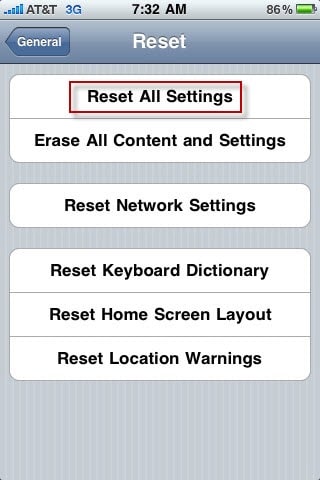
After you do the Reset, you will need to re-attach to iTunes and restore from your backup. Depending on the amount of data, photos, music, videos, applications, etc., this may take a while. After the sync is finished, you SHOULD have all of your missing applications back and hopefully in full working order.
Please leave a comment if this (or a different trick) worked for you so that others can learn.
Did you find this solution useful? If so: [paypal-donation reference=”Missing iPhone Apps”]
HTD says: Remember, there are solutions out there. Don’t be too afraid to try different things and when you find a solution, be sure to share it with others!


82 comments
ForwardLeap
Thanks for the post. It fixed my iphone. I did “Reset Home Screen Layout” instead of “All Settings.”
I wrote a post with what I did to fix my iphone here:
http://theiphonearena.blogspot.com/
Thanks again.
hyaku
Hi Michael Sheehan !
I saw your name at UNIALOCK user's blog list!
Because I found the great application for iPhone
from same country Japan, I thought you may be interested
in these…..try it!
It is called “bijoCal” and everyday it introduce a new
beautiful Japanese girl through, daily in weekdays.
I am thinking to produce a community among whom
interested in this….. do you like to join me?
PC:http://www.bijogoyomi.com/
iPhone:http://www.bijogoyomi.com/iphone.html
hyaku
happy iphone
reset home screen layout worked for me too; hope it helps some others
Kim
It worked! Thanks so much! I've spent too many hours trying to fix this, so I appreciate your solution!
Rick
The instructions you provided actually didn't work for me. However, after doing some more searching, I was able to restore the icons/apps by enabling then disabling Restrictions. Go to Settings -> General -> Restrictions. Click on Enable Restrictions. Provide any 4 digit pass code, verify pass code. Disable Restrictions. Provide same pass code. Done.
HowGood
Neither worked for me.
But I post here, as you laid out the steps that many of us have gone through.
What DID work (add it to the list) is DE-authorizing, then authorizing the computer, then syncing…
Hope this helps as well…
p.s. Spotlight finds only recent files. Download FindAnyFile (3rd party) to search all files. You may find your apps in the Home/Music/iTunes/Mobile Applications folder
amuseme
Nice job Rick very simple stuff. I’m a little embarrased that it wa so easy. Thank you!! Now how can I get my original Black wallpaper back on my home screen? any ideas I’m not sure what happened to it.
kusum
i forgot my 4 digit pass code…what do i do?
hightechdad
Hey, that is a great option that I didn't check. Thanks for posting
that other type of fix.
dave
Fantastic. Thanks so much for posting this! This is just what I needed – for obvious reasons.
PR
Your problem may have been different than mine – but after updating to 3.0 my apps were “missing” as well. Turns out, the update just did funny things with the home “pages”. My first page looked about right, and my second “page” only had one app (missing about 10). Turns out there was a 3rd page added – and all my apps were there. So they weren't missing, so much as moved to an odd place (a 3rd page, when the 2nd page was near empty).
Again, maybe different than your issue, but I just needed to move my apps back where they belonged. (confusing, but “correct” apple help article: http://support.apple.com/kb/TS2812)
lynette
I am a super dumb user – and I was dismayed to see my apps key disappear and 1/2 my apps…after the update it asked me a bunch of questions that I didn't really pay attention to because I was on a phone call. SO, what do I do?????? I just googled my problem and your solution came up. Thank you so much it worked perfectly! I don't know if I was supposed to disconnect my phone prior to the “reset” but I did. Thank you for being a person to figure this out AND then to share with the world!
Cynthia
This was EXACTLY my problem and this totally worked…THX
Davey
Enabling and disabling the restrictions worked for me.
odd.
John
reset home screen layout worked for me as well!!! Thanks!!!!!!!!
LaTonya
Thanks so much. The reset the screen instructions solved my application problem.
alfredo
what if your settings app is the one that is missing?!?!? help
[email protected]
hightechdad
Wow, that is an odd one. Did you try restarting your device? Did you
try searching for “Settings” using Spotlight? That might work. If
those steps don't work, you may have to do a reset/restore via iTunes
and re-apply the update if that doesn't work.
Danielle
THANKS! i was sooooo happy that this worked :)
Road Runner
Thanks for the details. Wish I would have seen it before resetting it. However I am more worried about hte apps. In doing so I have found something interesting that I should share. It’s called dirtymouthapp.com. Say a Dirty Phrase. DirtyMouth is a collection of dirty and nice phrases in five different languages.
Steve H.
I went through the steps of backing up my iPhone and doing the Reset All Settings and then restoring and did not get my apps back.
I selected to Sync only Selected Apps and then UN-Checked every single box and they clicked “Apply” that caused the iPhone to sync itself and removed all the apps. I then went back and selected only the apps that I was actually using and again when I clicked on “Apply” the iPhone did a sync and my apps were back!
Now what's interesting is after that I chose to Sync ALL Apps and when the iPhone did the sync the apps went away (Again!). So I repeated the un-install process and did the Sync Selected Apps Only and reselected only the apps I was using the most.
This dosen't make any sense to me, but that's what did the job and fixed the problem.
Mike
What if my settings were in a folder and I can't get to it, because it's now invisible. How do I get all my apps back? I have a 3G I just upgraded to OS 3.0, but it was jailbroken before, with apps in catergories but I went from my backup and have an unjailbroken 3.0, but 50 of my apps are invisible.
HELP!!!
barbiedc
this is damn good! after doing a lot of reboots & install/uninstall, a simple RESET ALL SETTINGS did it!
much thanks!
alanahuang99
I just upgraded my iphone from 2.2.1 to 3.0, all the apps don't work anymore. The app exit right away after a brief display of the splash screen.
Any idea? Thx
hightechdad
Have you tried fully rebooting/restarting your iPhone? You may have to
do a restore if that doesn't work.
alanahuang99
I did, many times. I manually removed each app and resync with iTunes and still no single works.
Can I use iTunes to restore iphone to 2.2.1?
hightechdad
Is your iPhone jailbroken or unlocked? What version is it? Have you
tried to do a restore? I do believe that you can downgrade. If you
have tried everything else, you may have to do that.
kcrider
oh my goodness….this was my issue too! I have been trying like mad to re-add these but really they were on another screen. They too were on a 3rd page, when just one app was on the 2nd page
stevengErrick
Hi I just updated my Iphone 3g and now for some reason none of the apps that a paid for isn't coming back up. I backed up my phone but when I wanted to put my apps back on it was asking for the original location. All the apps I purchased are under the apps icon in iTunes but I don't know how to transfer them…that's if I'm even able to.
hightechdad
You should just be able to sync it back to your iphone assuming to you
didn't do anything odd. Did you stop the process when it was updating?
kingdorke
omg dude, thank you so much! i had a jailbroken ipod touch 2g with the app “categories”. i just decided this morning i was gonna update to 3.0, so i did, taking away my jailbroken pleasures cuz i got a friend to do it for me cuz i am not tech savvy in this area. all of my categories apps were lost until i did this, i thank you so much man
steve07
After attempting several types of troubleshooting this problem, this corrected it…THANK YOU, THANK YOU, THANK YOU.
Manuja
Thank you so much for posting the enable and disable restrictions trick! It actually worked for my 2G 3.0 iPod Touch. I was so worried that my apps would never reappear. Thank you so much!
R E Beamer
This worked for my issues with my iPod Touch.
sharlenestriepe
Hi, my problem is I did update to the latest version 3.01 for iphone, before this things seemed to work. I go into I tunes and then the phone syncs, yes that is all ok, works 100%. Then when this is done, only then, do I unplu the phone from laptop, then when I try open or access any of my games that I have on the iphone or apps, they do not work, they like flash for a second, but you cannot access them, not all games mind you, just some. I also noted that on itunes I can not see my applications anywhere, nowhere, it says music,, etc , but no apps. Help me please as how I fixed this all the time, I then had to download a new app from the app store, then all of a sudden the apps, the old ones, work, well that is ok, but I want to know why my applications do not appear in Itunes in the first place, when they were there before I updated to the new version.
Hoping for a good answer and am I the only one battling with this???
richcutlass72
That didn't work for me.. I have the new Iphone 16GB and verything stopped working when I upgraded 3.0.1 from 3.0 I tried the hard reset. I tried to remove and add the applications. I then tried the reset and download an application not using the backup and that also didn't work. I will try some other things…
hightechdad
When you do a spotlight search for a named application, does it show
in the results? If not be sure you back up your iPhone and then try a
restore. Let me know how it goes.
stephentompkins
Thanks so much. I used this and it worked like a charm. Its also inspired me to write a blog entry on my blog about the importance of commenting on blogs. Thanks again.
mhay
i just update my iphone two days ago to 3.0 and all my apps was gone.. i did all the instructions i read here and still doesn't work.. please help :( because some of my apps is on my categories folders that came from cydia, is there's any other possible way to get it back?
hightechdad
It sounds to me, since you mentioned Cydia, that you are on a
Jailbroken iPhone. Any apps that you install from Cydia will not
appear until you re-jailbreak your iPhone and then reinstall those
applications. If applications that you bought through the iTunes store
are missing, you should follow the steps that are outlined in the
article as well as within some of the comments. Be sure that you get
the proper jailbreak tool from the Dev-Team blog.
mhay
actually i got all the apps from app store through Iphone. i just put it on folder “Categories” that came from cydia. That's what other people say too that once i jailbreak it again it will come back but i tried to jailbreak it last night but the tool i used doesn't work, Came up there's a cydia icon but no network and my others contacts doesn't come up so redo it again and update it. Do you have any idea whats the right tool to jailbreak 3.0? .08 software doesn't work :(
thanks for all the help, i really appreciate it :)
hightechdad
I have always downloaded from this trusted source: http://blog.iphone-dev.org/
The links are on the lefthand side.
londonog
Thanks so much…. :-) it works for me too,
God bless you and bless your family too; And hope you can help more pleople with this and many more problems with the Iphones.
Congratulations.
chiapet
Thanks! The other suggestions did not work, but this did the trick. Wish I'd read this before I tried uninstalling and reinstalling/synching the apps a few score times.
marcmetteauer
I did the reset and then restored 2x and still the apps try to open briefly, then close immediately. I am in hot water because this is my wife's phone. I am stumped.
ozzie364
Hi everyone….I just updated the iphone to OS 3.1 and had issues with third party apps opening. I had the same issue before when I went to OS 3.01 and ended up reloading all the apps while losing the data on some of them. I just tried the enable/disable restrictions through the settings>general>restrictions, as suggested below and it worked!!!! Thanks for the info. I was debating having to update the software if I was going to have to reload everything.
ozzie364
This was a great solution to the problem.
inhotwater2
Did the upgrade to 3.1 on my wife's iPhone 3G last night – everything appeared to work smoothly. When we went to check it out, lots of icons were missing from her phone. She had to go out of town, so I can't work on it until she gets back. But I'm in hot water – she is mad that she can't listen to iTunes. The icon is completely missing, as well as some of her games. We tried the enable/disable restrictions thing, that didn't help.
My question is, doesn't Apple test these upgrades at all before releasing them? Considering the amount of entries here, it sure doesn't appear that they test anything…
oobflyer
To restore from back-up you are assuming that the applications and other data are on your desktop computer, but when I updated to 3.1 all of my application disappeared from my iPhone AND my desktop. Was this the case for you? Could you attach your iPhone and see your applications within iTunes? Mine are all gone. At least I can re-download them for free, but what a huge hassle – I don't even remember which ones I had (I had 4 or 5 pages of applications).
hightechdad
Usually when you do a restore, there is a dropdown where you can
select what date you want to restore from. Did you do that? Also, are
you using the latest version of iTunes? The latest version of iTunes
has changed how the applications are presented. Be sure to click on
your iPhone in the left and then check the various tabs.
Name
hey mike! did you find any solution? coz i have same problem as yours…
Name
I just switched from a 1 gen 2g to the 3g. I upgraded the software, sync'ed the new phone and none of my downloaded apps are on my new phone. If I plug the old one back in, they show up there. CONFUSED
hightechdad
That is exactly what I did (except to a 3GS). Did you go through the
steps above? Did you restore from a backup or set up as a new phone?
Do you have the latest version of iTunes (it really makes the App
management a lot better). If you search for a particular app on your
new iPhone, do they show up?
Let me know!
Teddi
Thank you! It worked!
Mo
Phew I almost tried this out of fear. Just goes to show you should pause and think about it first. Clicking “sync” in iTunes did it for me.
Mo
Phew I almost tried this out of fear. Just goes to show you should pause and think about it first. Clicking “sync” in iTunes did it for me.
iphone mom
hi. I am reading how to restore iphone apps icons after upgrading
Unfortunately one of the icons missing is my “settings” icon. It totally disappeared.
iphone mom
iphone mom
hi. I am reading how to restore iphone apps icons after upgrading
Unfortunately one of the icons missing is my “settings” icon. It totally disappeared.
iphone mom
heathagazi
I tried all of the things in your list before even resorting to a google search. I figured I must've missed something. This did the trick and took less than a minute. Thanks for the help! Woot!
macinjosh
YES!!! I've been struggling with this for months. So glad I saw your comment before I did something rash! Thank you!
fenddi
i recently unlocked/jailbroke my iphone 3G, i had all my icons showing after the jailbreak/unlock, no problem. An hour later my ipod, mail, calculator icons werent showing/missing. i have tried resetting the home screen, going to settings-general-restriction-enable, then disable, but was unsuccessful. Please somebody help me!!
xk4l3x
ya well i accidentally put all of my apps in the category folder and now none of my apps are not on the home screen. not even settings. all i have is two bookmarks on my home screen. how do i get them back
xk4l3x
ya nvm i fixed it somehow. wut i did was put the two bookmarks in the bottom docks then it reset n got put in safety mode and i went to categories and removed all apps out of the folder n i fixed it. lol
Tim
YES the restrictions worked for me. FYI the app that was missing for me was Reqall.
Derry57
Thanks for this short & simple instruction – it worked for me.
Simon
This worked great for me (and even gave me some apps back that i had lost when i got my phone unlocked, also by telia).
Took about 10 seconds to fix :)
Jim
I had the missing applications for most (all but two, i think) of my applications after restoring the last backup from my old iphone 3GS onto a replacement iphone after the original one stopped connecting to the telco network.
I tried the fixes suggested on this thread, but they didn't work. Hunting around for *.ipa, (on Vista), I found the apps under C:Users[NAME]MusiciTunesMobile Applications, and dragged them into the iTunes Applications folder (which was previously empty). From there it was a simple matter of synching the iphone, responding to the warning that all applications on the phone will be lost) and they are all now restored to the phone.
Hope this helps someone.
Redplanet
I found the ipa files of the apps still on my mac in the itunes/mobile applications folder. by opening these files from the folder they are directly imported to itunes and hence restored without any fuss…..
JW
Adelinagonzales29
did not work for me
Sam
I did the ‘Fix for missing applications’ as described above, but it dod nort work for me. So, I dragged the missing Apps from the iTunes list on the PC to my phone, and ‘bingo’ it did reinstalls or Synchronisations which put all the missing Apps back on the phone!!
hightechdad
Great! Thanks for posting your solution. It’s helpful to other readers.
Lucky_abi12
actly my prob is in itunes my apps which i synced r showing but its not showing in my iphone dos any1 noe how to slove dis ???
inca
I had to get all of my .ipa App files from backup and drag them into iTunes. Then Sync. Then go into iTunes/iPod/Apps and check all of the boxes again. Then Sync again. That got mine back.
I think iTunes interface is junky. iTunes backup and restore design is junk too.
Worst of all, the support.apple.com kb articles are completely misleading and incomplete. I almost gave up and just figured my apps were gone. What a bunch of s$!%. I miss my Palm III which had a simple backup and structure and documentation!
This is the best webpage I’ve found. Thanks!!!!
Facebook Applications
nice one i really like it..
Pe1380
It worked for me. Thank you!
Katareena11
HELP!!! I had to update my software for my iPhone and once it was done- my ‘Project 365’ app (which had 6 months worth of photos of my daughter) was the only app missing?! WTH do i do!? its not even listed on itunes either!? but every other app was still there?! hheelppppppp meeeeeee!!!!!!!!!!!
hightechdad
While I can’t guarantee that it will work, try installing it directly on
your phone via the App Store on your iPhone. Perhaps it will find the DB
of your photos. Good luck and let me know.
Alex
Here is how I solved it:
Went to the store and downloaded duck hunter lite. Played a game and after that all my apps worked. Good luck.
Ernie
This is unnecessary. All that you need to do is go to the apps section of itunes and check sync apps and check all of the apps that you want synced.
Moeteise Surrey
Try this fix if your Apps disappearing when you sync with iTunes? http://surreystore.com/main/index.php/technology/apple/262-apps-dissapearing-when-you-sync-with-itunes
Moeteise Surrey
Try this fix if your Apps disappearing when you sync with
iTunes?
http://surreystore.com/main/index.php/technology/apple/262-apps-dissapearing-when-you-sync-with-itunes
Facebook Applications
I was having the same problem, Googled it and found your post. Thanks alot.