


In early 2026, I was laid off, and the job search that followed has become a bit of a whack-a-mole effort. I check the same job boards, try a few job search services, and send another slightly different version of my resume through yet another application portal. Then I wait. Searching takes forever, and a lot of what I send seems to disappear.
It wasn’t always like this. Back when resumes got mailed (yes, using USPS), I put real thought into mine. I picked heavy bond paper, sometimes with a slight tint, because the paper said something about me before anyone read a word. I carefully chose from a limited array of fonts available. Eventually, when someone opened that envelope, held that page, and noticed it, it was, hopefully, a differentiator.
Today, an automated system flattens my carefully built resume into words with no personality or intentionality. If it gets read at all, software screens it first and treats me like a row in a database, not a person with substance behind it.
The more I thought about it, the more I saw the real problem. Hiring is supposed to be a two-way conversation, and right now it runs in one direction. Applicant tracking systems (ATSs) are impersonal by design, and a static resume gives the system (or eventually a human reader) nothing to do but accept or reject it. Somewhere in that machine loop, I stopped asking how to get past the system and started asking how to talk to a person.
What if I could email a hiring manager or recruiter one link, outside of LinkedIn or Indeed, and have it show them the version of my story I wanted them to see? I also wanted different people to get different levels of access, and I wanted the page to be useful to whoever was reading it. That question became CandorBrief, a WordPress plugin I built for myself first and then released for anyone who wants it.
Table of Contents
Why does the job search feel so one-sided?
I’m not imagining the pressure, and neither are you. The Bureau of Labor Statistics’ September 2026 jobs report counted 1.9 million Americans as long-term unemployed, meaning they’d been out of work for 27 weeks or more. That’s 27.1 percent of everyone who’s unemployed, and the average unemployed person had been searching for 24.8 weeks. Nearly six months of searching can feel like shouting into a void.
Volume plays a big role in why it feels that way. LinkedIn’s January 2026 talent research found that the number of US applicants per open role has doubled since spring 2022. On the other side of the desk, ZipRecruiter’s 2026 AI Employer Report surveyed more than 1,000 talent acquisition professionals and hiring managers in June 2026, and 24 percent said they can almost always tell when a candidate used AI. So, the person reading is skimming more applications with less certainty about what’s real. I can’t prove that’s why my applications went “unnoticed,” but I’m starting to draw some conclusions.
Everyone is trying to stand out through the same narrow pipe, and I don’t think another round of keyword tuning will fix it. I think the answer is to be more intentional about how you show up and give the other person a reason to lean in. That’s the gap I wanted CandorBrief to fill.
Solve your own problems first
I recently listened to a business podcast where a founder gave one piece of advice on what to build: solve your own problems first. That’s what I’ve been doing since I started building with AI. Prompt writing, vibe coding, small tools I wanted to exist. AI building is my new reading. I learn by trying, and the fastest way for me to try is to build something I need.

Every product on my HTD products page started that way, with a problem I had or kept running into. I built AppAudit because I needed to know what was installed on my Mac before a migration, which I wrote about in Why I Built AppAudit. CandorBrief is the one where the problem was me. For the record, I didn’t hand the whole thing to one AI and walk away. I used Codex for the coding, then Claude for the design, QA, and the website, and I directed the work and tested what came back. But I grounded it in my own pain and experience.
Once it did what I needed (and, honestly, I don’t think I’m at the “final version” yet), I realized other people stuck in the same “hiring invisibility” loop might get something out of it too. That’s why there’s a free version, and why I wanted it to be complete instead of a teaser.
What is CandorBrief?
CandorBrief is a WordPress plugin that turns your Resume/CV into a focused, privacy-aware professional profile you can share with one link. You choose which parts are public, who gets to see more, and how much a visitor gets before they have to ask to view more. It’s built for the conversation around your resume, with a hiring manager, recruiter, founder, or prospective client. If heavy bond paper was the way to make a resume memorable in the mailbox era, this is my attempt at the portal-era version.

It didn’t start there. It began as a way to present my own resume differently. Then I started thinking about the person on the other end, and about how AI could make my professional information and experiences useful to them without taking the story out of my hands. That’s where AI prompts come in, which I’ll get to in a minute.
How does CandorBrief work?
There are four steps, and none of them require you to hand your resume file to a plugin.
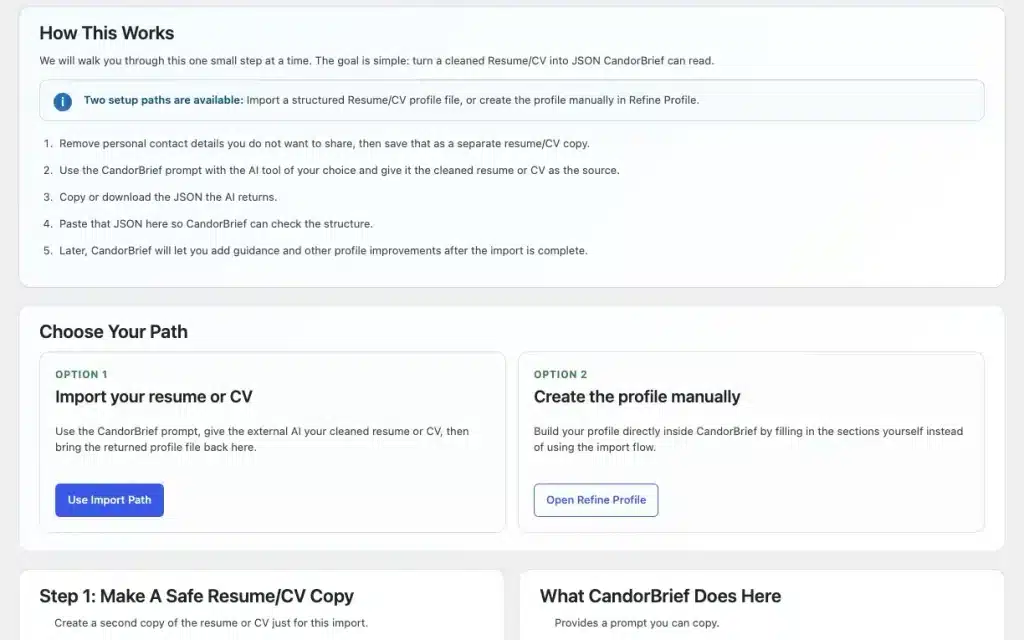
- Import your resume the careful way. CandorBrief gives you a prompt to copy into the AI tool you already use. Remove your personal details from your Resume/CV first, run the prompt, then paste the structured result back into WordPress for validation. The plugin never uploads or parses your resume file itself. If you don’t want to go that route, you can manually build your profile without any import.
- Edit what comes back. You can then edit work history, education, skills, links, and more into the shape you want them to be. It’s a living doc you can edit anytime, unlike a printed resume or one you emailed as a PDF.
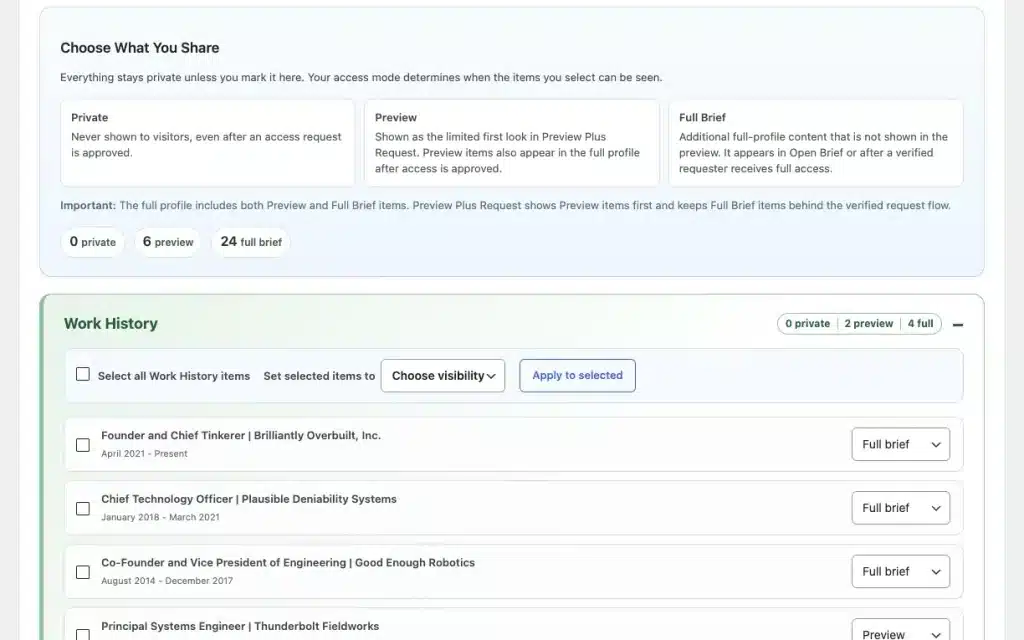
- Decide what’s public. Everything starts private. Each item has its own public/private toggle, and nothing shows until you publish.
- Pick how people get in. There are five access modes: an open brief, a preview with a request for the rest, request-only, private, and an invite-only Protected Brief with a link you can revoke. Then you share one link. Put it on your email signature, as a link in your bio, on another profile page, basically, wherever you want.
If you’d rather see one before you install anything, I built two fictional demo profiles you can click through on the CandorBrief demos page: Mara Voss on Free and Milo Sparks on Pro.
How do the prompts work for professionals and hiring managers?
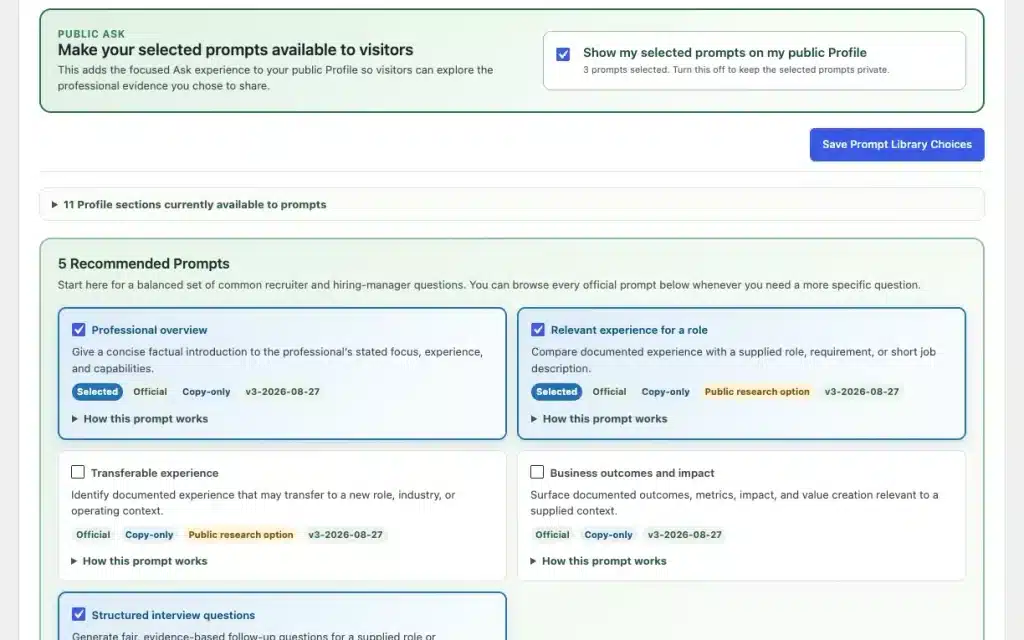
I’m most curious to see how people use the AI prompts, and they work differently depending on which side of the link you’re on. If you’re the professional, CandorBrief includes an official library of 40 AI prompts for hiring, understanding work experience, showcasing your professional side, and more. You review them and choose which prompts visitors can see and use. On CandorBrief Free, you can have up to three prompts active and visible at a time. CandorBrief Pro lets you offer every eligible prompt (up to 40) on each profile. Milo Sparks, my Pro demo profile, offers 21 questions grouped into eight topics as an example; nothing in that AI prompt menu appears until you decide to publish it.
Each AI prompt points at a different part of the profile. The first group gives a reader quick, factual orientation: a concise overview, the progression and pivots across a career, and the work areas that show up most. Others dig into evidence. Business outcomes and impact surfaces documented metrics and results, Project delivery evidence looks for planning and execution, and People leadership looks for documented leadership of teams and their development. Further down are questions for senior roles, like Board or governance readiness and Executive stakeholder influence. I think the evaluation prompts are the most useful. Evidence to validate pulls out the facts that need confirmation or deeper discussion, and Reference-check themes prepare factual themes for a reference call. Each one works only from what the professional chose to make public.
Now flip to the hiring manager or recruiter. They open your link, read the profile, then pick a topical AI prompt from the menu. The first few work without any other context. For most of the rest, a recruiter or hiring manager can paste in a job requirement or a short job description in a box labeled “Role or review context” and click Build Prompt. A comparison prompt then aligns your documented experience with that requirement. A readiness prompt prepares factual questions about the evidence needed for that role. The reader reviews the finished prompt and its evidence, then copies it or downloads it as a text file and takes it to the AI tool they already use. Some prompts include an optional setting that lets their AI tool of choice look at public information and cite the source, link, and date for anything it finds.
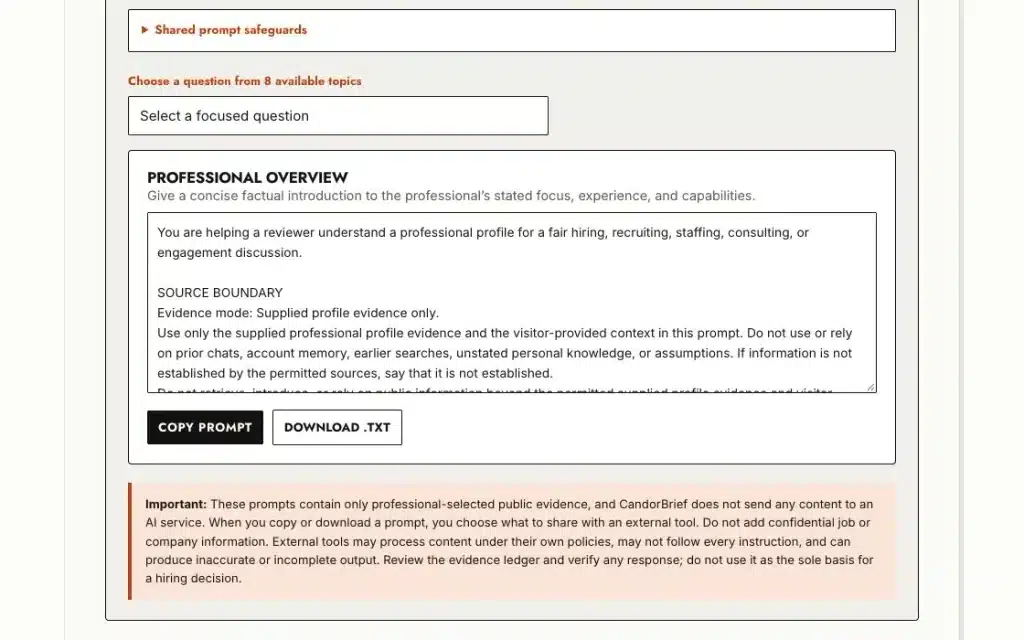
The prompt library also includes guardrails. The reader is told to check the AI’s answer against their own materials, leave confidential job or company details out of the context box, and not use any of it as the sole basis for a hiring decision.
I wanted to create a more two-way conversation. A one-way resume asks the reader to guess. A CandorBrief lets the reader ask better questions and lets you, the professional, decide which questions are on the table.
Where does AI fit in, and where did I leave it out?
I think of CandorBrief as BYO-AI, short for “bring your own AI.” The plugin has no AI calls or connections; it gives people a structured way to use the AI tool they already use with the information you’ve chosen to share.
CandorBrief never calls OpenAI, Claude, Gemini, or any other AI service from inside WordPress. The prompts are copy-only, fully visible, and editable, and the reader decides which AI tool they use.
Each prompt tells the AI not to infer protected characteristics or make hiring recommendations, but once a prompt leaves WordPress, I can’t control what a third-party AI tool does with it. Guardrails are instructions, not guarantees.
The reader gets AI help on their terms, I never touch an API bill or a black box, and your profile stays in your own WordPress database. I don’t have access to it.
What does a hiring manager or recruiter see?
The hiring manager, recruiter, or other interested party gets a link. They don’t have to create an account or remember a password. They land on a focused page with the parts you chose to make public and, depending on the access mode you picked, a way to ask for more. If prompts are available, they can read one in full and copy it. If they’d rather skim, they skim the CandorBrief profile itself. This is what makes the conversation two-way: the reader has something to do and something to ask.
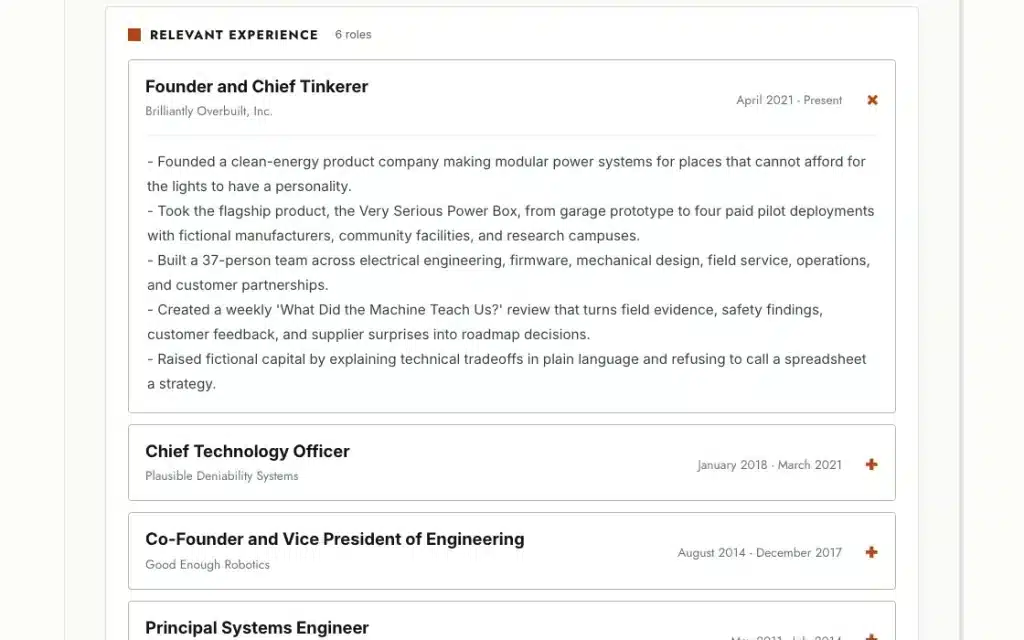
I think about three kinds of readers. A recruiter prepping for a candidate screen who wants context before the call. A founder deciding whether to take a conversation about a fractional or advisory role. A prospective client sizing up a consultant. None of them want to dig through a pile of attachments, and none of them should have to guess what you’re comfortable sharing.
What is the difference between Free and Pro?
Free is the complete version for one profile. Pro builds on Free for people who need more than one story.
| CandorBrief Free | CandorBrief Pro | |
| Profiles | 1 | Your Free profile plus up to 5 profile variations |
| Resume/CV import and per-item visibility | Included | Included for every profile |
| Access modes | All five (Open Brief, Preview Plus Request, Request-Only, Protected Brief, Private) | All five for every profile |
| Prompt library | 40 prompts, up to 3 public at a time | Every eligible prompt available |
| Public styles | 1 (Refined) | 6 |
| Cost | Free, no subscription | One-time purchase |
| Requires | A WordPress site you manage | CandorBrief Free |
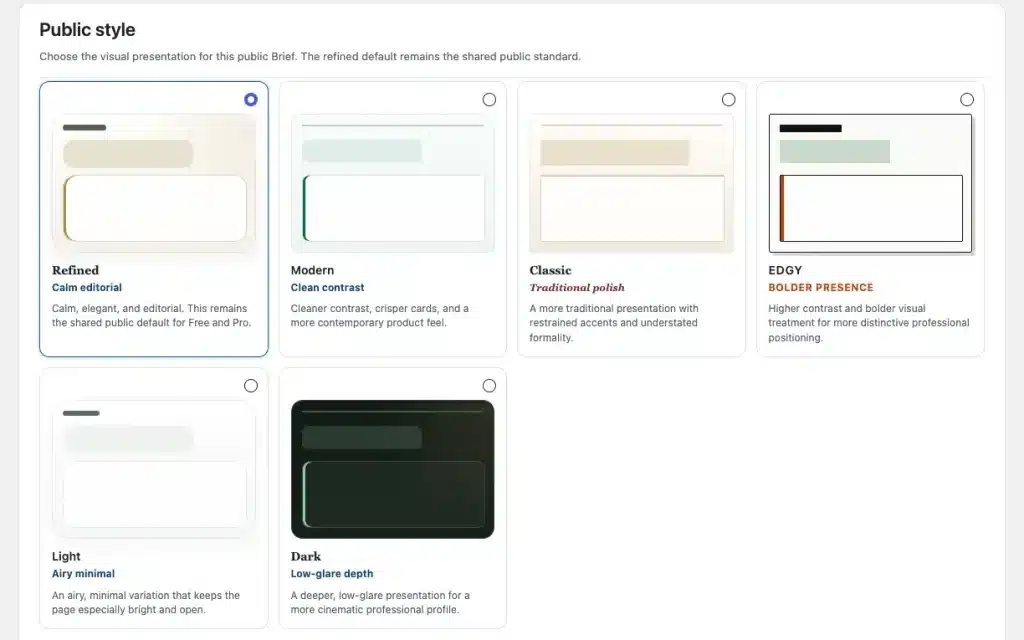
CandorBrief Pro exists because of a problem in my own resume-writing process. I kept making slightly different versions of my resume for different submissions, so I built Pro to keep up to five variations, each with its own URL, access mode, and prompt selection. The version I send a startup founder doesn’t have to match the one I send a large company’s recruiter, and neither should overwrite the other.
What do you need to run CandorBrief?
CandorBrief is a WordPress plugin, so you need a WordPress site you manage. That means WordPress 6.6 or later, PHP 8.3 or later, admin access to install plugins and create a page, and working outgoing email, because the verification and invitation messages go out from your site. Pro needs Free installed first.
I built it specifically for WordPress for two reasons. I already publish on WordPress, and I know it well. It also lets your profile live in your own database, on a site you control, which fits the whole idea of choosing who sees what. I haven’t tested CandorBrief on WordPress.com, so I won’t promise it works there. If you don’t have a WordPress site today, that’s a real hurdle, and I’d rather tell you now than have you find out after you click download.
What does CandorBrief not do?
It doesn’t change how the resume or application submission process works. The applicant tracking system still gets your resume, and the form still asks for what it asks for. CandorBrief is the link you add alongside it, in an email, in a follow-up after a screen, or in a note to someone you’d like to talk to.
It doesn’t write your resume, score you, or decide who gets hired. (I did build in a little bit of functionality for when you DO get hired, though.)
It does, however, give you a different, hopefully unique way to present yourself, your experience, and what you want to showcase.
Frequently asked questions about CandorBrief
-
What is CandorBrief?
CandorBrief is a WordPress plugin that turns a Resume/CV into a focused, privacy-aware professional profile you share with one link. You choose what’s public and how much a visitor can see. I built it for conversations around resumes with hiring managers, recruiters, founders, and prospective clients.
-
Is CandorBrief free?
Yes. CandorBrief Free is free, with one complete profile, guided Resume/CV import, per-item visibility controls, all five access modes, and a 40-prompt library with up to three prompts public at a time. No subscription or AI API key required. Pro is a separate one-time purchase that adds profile variations, more profile styles, and additional ways to present your experience.
-
Does CandorBrief use AI?
Not inside WordPress. The plugin never calls OpenAI, Claude, Gemini, or any other AI service. It assembles copy-only prompts that readers review in full and paste into the AI tool they already use. The Resume/CV import works the same way: you run the prompt in your own AI tool and get the result back based on the detailed prompt.
-
Do I need a WordPress site to use CandorBrief?
Yes. You need a WordPress site you manage, running WordPress 6.6 or later and PHP 8.3 or later, where you can install plugins and create a page. Your site also needs working outgoing email. I haven’t tested it on WordPress.com, so I can’t promise it works there.
-
Who can see my CandorBrief, and where does my data live?
Only what you make public, and only to whoever you allow in. Everything is private by default, each item has its own toggle, and nothing shows until you publish. You then pick one of five access modes. Your profile lives in your own WordPress database, and I don’t receive it.
-
Will CandorBrief get me past an applicant tracking system?
No, and it doesn’t try to. CandorBrief doesn’t change how an application or an ATS works. Your resume still goes where it goes. CandorBrief is the link you can add alongside it, in an email, a follow-up, or a note to someone you want to talk to.
-
Do hiring managers and recruiters need an account to view it?
No. Visitors don’t need a WordPress account or a password to read a public brief, request more access, or use an invite. Depending on the access mode you choose, they may verify their email address before you share more.
-
What does CandorBrief Pro add?
Pro builds on Free. It adds up to five more profile variations, each with its own URL, access mode, and prompt selection, plus all six public styles and no cap on public prompts. It’s for people who need a different version of their story for different audiences. It requires CandorBrief Free.
Should you try CandorBrief?
Try CandorBrief if you keep making slightly different versions of your resume for different audiences. Try it if you want to share more than a PDF without putting your whole career on a public page. Try it if you already run a WordPress site and like having control over where your information lives. Skip it if you want a tool that applies to jobs for you, or one that ranks candidates. That’s not what CandorBrief is.
You can get CandorBrief Free and see the full details at candorbrief.com. If you’d like the shorter version of why I built it, it’s on the CandorBrief page of my HTD products page, along with everything else I’ve built to solve my own problems. And if you have questions or feature ideas, contact me.
Let me know what you think! I’m open to feedback and ideas for new features. What is intriguing? What is holding you back from using it?
HTD says: I built CandorBrief to help me overcome hurdles in my own job search, and I hope it helps others stuck in the same loop. Hiring should be a conversation, and a static resume only speaks one direction. Start with Free. Add Pro only if you want a different version for different audiences, which is exactly where I landed.


