


I have an older MacBook Air and absolutely love it. It has performed flawlessly and is well used by me and my kids. However, I have had a lingering issue that has appeared every few months or so that has often left me scratching my head. Sometimes, when I plug in my 45 watt power supply, the little green light on the MagSafe doesn’t come on and the MacBook Air doesn’t charge. And, it seems that this is a problem that others have encountered. So I wanted to share a couple of solutions that may help resolve this issue, one of which worked for me – and you will be absolutely SHOCKED at what the solution was!

Before I give away the trick that worked for me, I thought that I would share another fix that you should at least attempt prior to doing the one that work. That way, you can still say that you “tried all of the recommended fixes.”
Reset your System Management Controller (SMC)
Sometimes your MacBook may show odd issues like a racing fan despite no heavy usage or the battery appearing to not charge properly. If this happens, you might want to reset your System Management Controller (SMC) which is a very easy process. Here are the exact instructions from the Apple Support Knowledgebase:
- Shut down the computer.
- Plug in the MagSafe power adapter to a power source, connecting it to the Mac if its not already connected.
- On the built-in keyboard, press the (left side) Shift-Control-Option keys and the power button at the same time.
- Release all the keys and the power button at the same time.
- Press the power button to turn on the computer.
Note: The LED on the MagSafe power adapter may change states or temporarily turn off when you reset the SMC.
Unfortunately, this fix did not work for me. My charger was not showing as green or amber or any color for that matter. And my MacBook Air was not charging.
The Fix that “Warms” your Heart
So despite trying to fix the charging (or lack thereof) issue using a documented Apple process, I turned to the Apple Support forums and found a solution that, when you read it, you are not going to believe.
It turns out that the 45W charger needs some tender loving care when it is cold. That’s right, if the square part (shown below) is cold, for one reason or another, it won’t work.
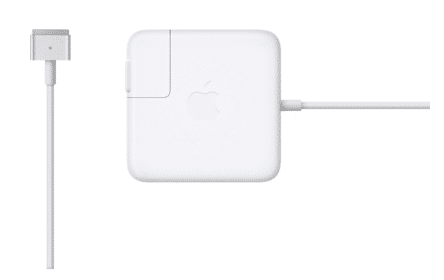
I’m not sure if newer power supplies have corrected this issue, but with my older MacBook Air with the original power supply, the following “heating” trick worked. The fix is easy.
- Plug in your charger to the wall/surge protector and into your MacBook Air.
- Take the square portion (that normally heats up when it is charging) and warm it up. I simply sat on it on the bed for a while. Some people have put it under their armpit.
- Sit and watch for the light on the MagSafe connector to magically turn on after a few minutes.
- Rejoice that there is, indeed, a technology god!
[easy-tweet tweet=”MacBook Air not charging? This AMAZING fix actually gets your Mac charging again! ” user=”HighTechDad”]
I was completely skeptical about this fix but I figured that I would test it out. I simply sat on the “brick” like a hen for about 5 minutes or so while I continued to search for other solutions. Then, to my amazement, the MagSafe charging light turned on and my MacBook Air was actually charging!
Wow!
So, if you encounter this issue where your MagSafe 45W MacBook Air power supply is not charging your MacBook Air, it simply could mean that the brick part is feeling a bit cold. Warm it up for a few minutes and see if it becomes happy again.
Leave a comment to let me know if this worked for you!
HTD says: Sometimes the most non-technical of solutions can fix your IT problems!


141 comments
Janet
You’re right! I’ve had the same difficulty this winter with my MacAir charger and noticed that the problem occurred only when the charger was plugged into a wall that isn’t well insulated and tends to get cold, whereas no problem when the charger was plugged into an outlet near baseboard heat. Thank you!
hightechdad
I have actually tried using a hairdryer recently, which also worked and sped up the process. Just be sure to not overheat the brick!
Amanda Grieme
I am trying it right now!!! Hen-like! hahahah Will give you my report!!! GREAT ADVICE! Kindly, Amanda
Todd
Thank you so much. I can’t believe this actually worked. Saved me a trip to the apple store and all that exposure to smug. I’m sure they would have tried to sell me an expensive replacement adapter.
jb
Yes, this worked for me. I still think I have an issue with the battery. However, I am now able to backup my data. Thanks.
v
i have my mid 2011 mba. today it wasn’t charging for the first time ever. heating helped. Thanx
Uzair Rahim
Thanks!! Simply rubbing the connector worked for me
CJ
Worked perfectly for me, makes total sense too.
The metal connectors will expand when hot, this pushes against their fixings and over time the parts move position.
Once they have moved far enough they will no longer touch when cold so the charger won’t work.
Warming it up a little re-expands the connectors far enough to make them touch and get the charger working, at which point the heat it generates on its own will keep it hot.
hightechdad
That makes a lot of sense to me! Thanks for the explanation!
Dan
This is brilliant! It worked — I heated mine in front of the fire, toasty warm and it worked! You saved me $80, thanks a ton!!
stone
thanks for he tip it freakin’ works =)
Cheap Gas
I genuinely can’t believe this worked.. As an electrical engineer I thought you were kidding. Did it, am a hen now! Merci, it worked!
Cheap Gas
Oh, and mine was a macbook 13″.
lozers
Couldn’t thank you enough for the heating fix. :)
DD
Haaha. wow..worked like magic. Been struggling with my charger for like forever anytime i get back from school. Now its all a thing of the past
twxy
oh my god the heating trick actually works. I hadn’t used my laptop in a week so my charger was left cold on my desk. Decided to heat it with my hairdryer and the light suddenly came on! does anyone know if this is a permanent solution or if there really is some internal problem that will act up again? Thanks for the great advice anyways!
Angelito
i did the same with hair dryer, it work! Thanks hightechdad!
LorinT
This kind of fix would probably only work if inside the power adapter there’s a slight crack in a connection inside. Sometimes this is called a “cold solder joint”. When cold the connection is not in place, and when it warms, even slightly, then the crack is pushed together, and current can flow.
So while this trick works, it’s very likely that over time as the supply is heated and cooled, it will get worse and worse, and need more heat in order to start back up again.
cfb
Add me to the list of the gobsmacked. Mystery solved– Cold linoleum floors in a air-conditioned office. Thanks so much for this tip. (Still hanging in there with a 2010 MacBook Pro)
Amanda
wow thaaankss! it really works!
hightech
I over the years I have bought 3 new chargers for my 2011 macbook air..seems like the problem was that the end of the charger and the charging port on the computer simply needed to be cleaned with a stiff plastic brush…Now all the chargers work ..no problems with intermittent connections and this also should help with heat issues at the connection point as the mac book battery takes alot of power to re charge when discharged completely..
John
Cant read the article because this dumbass side toolbar is blocking the view!! Get rid of that stupid thing!!
hightechdad
What size monitor or resolution are you using? You can also view the content on a mobile device and the sharing slider isn’t there when using the mobile theme. Thanks for the feedback.
Kristen
Click the arrow and it goes away?
Line Fricke
How do you sit on it while it’s plugged in I’m wondering? Sitting on mine right now unplugged…. Fingers crossed (:
Ashley
I had my plug in when I sat on mine And it worked for me
aeilea
unplug it first, no need to get electric shock on the bum
Amanda
Worked for me! I held the connector over my toaster oven and it worked. Made waffles and fixed my charger win win!
JemCa
Oh. My. I thought this was a prank (put it under your armpit?!) but I just left my charger plugged in to a powerboard for a while – under the duvet on my bed – and it has come back to life!!! Been in an air conditioned filled hotel room for past couple of days so this totally makes sense!! Thanks so much for posting this quick fix!!!
mrmkhs1
I squeezed it between my finger and thumb. Magic! Thank you or Maraming Salamat Sa Inyo.
R. Hansort
Thank you so much for this post. You sure helped a hell of a lot better than the Apple Store in Amsterdam! Cheers!
Jill Easton
Amazing!!!! It worked – just holding in hot hands for a few minutes. Genius
Help!!
Can u put It next to a heater?
SRG
Wow. It worked in about 30 seconds. Thanks!
Kevin Olive
I’m also having the not-charging problem on my 2013 MBA but with an Apple Thunderbolt display. The little light even lit green, but netstat battery toolbar still showed “not charging”, and then the light slowly dimmed and shut off. My nephew has a very old 17″ macbook and has to rotate the plug sometimes to get it to charge. So i removed the tiny little magsafe adaptor, rotated it 180 and put it back. Problem solved. This is weird stuff.
Beth
Thank you! Sitting on it worked!
JAS
Yes! Yes! Yes! it absolutely works, this is Brilliant advice….thank you very much for the post :) and for all you folks who would think this is stupid even before trying …..PLZ DO try it out first.
Jonas Alves
I know it sounds ridiculous – and I was skeptical about it – but the warming solution just worked with my 60W MagSafe adapter (part number A1344). It’s not even cold here: it’s 26º Celsuis / 79º Farenheit o.O
Nancy Saad Smith
Yes!!! Warming the charging brick works! I recently had moved my mac air to a outlet on the outside wall of our 55+ old home. And noticed that the charging light wouldn’t come on. Then it would so just thought i didn’t have it pushed in. After 4 days the battery only showed 46% charged. This is when I realized it had not charged for four days and that their wasn’t any light indicating charging or charged. After reading this article, I heated a dry dish cloth in the microwave for 60 seconds. It was warm but not hot to touch. I just wrapped it around the brick. Within seconds it warmed up and WORKED. Now charging at the kitchen table via an inside outlet. Woohoo!!! Thanks Tech Dad!
Elizabeth Arciniegas
Thanks!! It worked for me!
hl
It worked once for me, and then a couple days later, my charger did the same thing, and heating it up didn’t work the second time
Mudasser Habib
In cold January, I opened my computer after about 3 months break, it was not charging. I heated charger and it started working. Thanks Michael!
John P
worked for me – thank you. i just left the cable lying on the carpet in direct sunlight for 15 mins :-) had tried everything else to no avail so v pleased.
Mike
IT WORKED!!!!!!!!
SKV
How long do I need to sit on it for – have been at it for 5 minutes but still no luck. Tried the hair dryer for a bit as well. The Power Source reads “Adapter” but the Battery is not charging and the LED isn’t coming on :(
kjo43
Cheers, fixed my issue February 16th 2015!
Marino O.
How can i said this… THANK YOU THANK YOU THANK YOU THANK YOUUUUUUUUUUUUUUUUUUUUUU what an amazing tip. You just saved me 80€ on a new magsafe. Where can I send you a box of chocolates? ;))
hightechdad
Haha! Glad that it worked for you!
Brinley Pavitt
Worked for me. Thanks. :) Used a heat gun on low temperature.
ellerooo
I walked outside with my charger in a handbag for 30 minutes in -10C and my charger died. I tried sitting on the charger, blowdrying the charged but no luck. Then I rested the charger on the top of the toaster oven for about 15 minutes and it worked. THANK YOU HighTechDad!!!!
Jeb Hawkins
Just had this same issue with my mac book pro working in a cold warehouse, would power laptop from mains but not charge green light only. after a few minutes warming it all up, bing orange light and charging. Thanks for the tip . . . i had a feeling the cold might have been the culprit.
Keith Halverson
Hahahah so great! Literally worked within seconds for me! Never ld even think to do that. Awesome! Charging as we speak!
Thank you!!!!!!! ????????
ashley
The “hen” method worked for me too! Thank you so much. And giving my husband a great laugh seeIng me use this method. Lol
Jason
Thank you hitecdad it works left it for few days and it must have gotten a chill poor little charger. Put it on my leg and covered it with my hand for ten mins and hey presto light came on and we’re charging if there is an IT God your Moses nice one.
Felicia
while I use the laptop (I use it for my school project,so it’s been on for a loooong time),I didn’t realize that the charger don’t work,the green light won’t turn on,and the screen shows no sign of being charged. I’m sure that the “square part” has already hot because I’ve use it for a few hours. Is it because I use it for too long?
hightechdad
Hard to know exactly. Yes, the “brick” will get warm while it is attached to the computer. Sometimes, it helps to disconnect your power cord from the wall and try a different plug as well as disconnect it from the computer and then plug it all back in again.
felicia
Thank you for your reply,but I’ve tried that since yesterday,and there’s no change at all. I finally buy the new charger,but it’s coming next week.. So,yeah thank you btw :)
Nikita
I tried the heating thing and my charger started working for like 5 seconds but then my laptop died (not because it was not charged but just randomly). I had to restart my laptop and tried heating the charger more but it won’t work any longer. Any ideas?
Mark D Aust.
Yep… No charging was my issue… I sat on the brick… and behold the amber light flickered into operation… Amazing!
Thank you;)
Thank You it really works, I placed my over a cup of hot water covered with a kitchen cloth
Anders Munck
That – actually – worked. Completely flabbergasted. I’ve worked in IT for twenty years and never seen anything like this. Stuck it on a radiator while looking for other options, and presto.. it worked.
Olivier Fabregas
Wow this trick worked, my MacBook stopped charging and I was so stressed then I read your advice. Warmed my charger and I plugged it to the Mac n it worked; thank you so much
Jamie Waters
+1 Genius.
Jacks
Thank you! Can’t believe this works. You’ve saved me!
akn676
Yes it worked with hairdryer! thanks!!!
aeilea
I totally thought this was a joke to see who would sit on their plug like an idiot, but it worked. How funny.
Michael
Sometimes when I plug mine in, the green light comes on, but it doesn’t change to amber and it doesn’t start charging, even though the battery is low. Weirdly I have discovered that if this happens, I hold the Mac flat with one hand, holding it on the back left corner, where the plug is. After about thirty seconds the light turns amber and it begins to charge, no idea why.
Lashay J. Lewis
Wow. I did NOT think this was going to work and it did! Wooooooow.
Paul
Oh my goodness! Was just about to shell out NZD120 for a new adapter and stumbled across this forum. Popped the brick under my leg for about 5 or so minutes and voila! The joys of solid state electronics! Thank you so much!
Sophia
OMG it worked!! Thank you, thank you! Btw I have a new Apple MacBook Pro but using an older MacBook charger but the trick still worked. This was life saving!
johannes b bols
P****.OF.SHII.WHO EVER F***** HEARD OF THIS KIND OF CRAP WHEN I PAID $1300 FOR IT? I GO FROM UNBRIDLED STATE OF RAGE TO UNBRIDLED STATE OF RAGE W/MAC. NEVER AGAIN!!!!!!
Claire
Amazing! Worked for me after 10 mins in the armpit!
Tadertot Thomas
Thank you thank you thank you!!!! I thought my computer was a goner!
Maryline
Yes It worked! For the Summer Vacation I went away (for 8 weeks) and hadn’t used my laptop since then. I tried to charge it but it sais that the battery is not charging, even though the screen lit up when I connected my charger to my Laptop. I sat on it for 5-10 minutes and after plugging it in, the orange light popped up and it was charging! Thanks so much! I was laughed at by my brother, but he was surprised at the end!
Yay!
fatwhitemale
MacBookAir 5,2 , just replaced battery. The power adapter worked fine (light on MagSafe) with the old malfunctioning battery; only then, if the MagSafe was disconnected the machine immediately shut down. Now, with the new battery in, the machine runs fine without having the power adapter plugged in but now, the power adapter does not seem to be charging the battery. The MagSafe light is off, no charging status shows. This is the reason we came to this thread and have been working on hatching our power block.
Question: does that little narrow elongated black knobby pin thing mounted in the center of the inside of the bottom panel act as a switch of some sort? It aligns and goes into the centre of the battery. The old pin had become dislodged from the cover.
We have taken to putting the old battery back in and presto, the MagSafe works. Weird.
We know the power adapter is working – it delivers power.
We know the new battery works and delivers power.
Thinking.
hightechdad
You are brave to take it apart! Honestly, I don’t know. Some people said that some solder may have cracked preventing a connection and only after some heat (causing expansion) connects the circuit allowing it to charge.
I also think that batteries have firmware and there could perhaps be a conflict there.
Do let me know what you discover.
Danang Widiantoro
I think my mac is the one need to be charged not my armpit or my butt.
Ashley
Thank you so much!! I tried the first solution and it worked for me instantly. I was very upset thinking that the charger for my brand new mac air was broken. Great advice!
Mohamed Meziani
I am grateful to you for your explanation, Thank you so much
adamyounglove
Thank you so much!! I was skeptical about this at first but then I cut to the chase, grabbed my hair dryer and TADA! The amber glow was back!! Works like a charm. Thank you!
Tiffani
I can’t believe this but sitting on it actually worked. Thank you!
Martin
Thank you. Sometimes the hradest questions have the easiest answers. You really are hightechdad.
P. Ermis
OMG you are a freaking genius!!!!!!!
Ricardo
This is probably a nice article and all that but the auto-playing enterprise cloud nonsensical video made me scroll to the bottom to write this comment without even glancing at it.
Stop auto-playing videos, it’s 2015 people are damn well capable of pressing PLAY on something they want to see.
hightechdad
Thanks for the feedback. I realize that the auto play can be annoying but the site lives on advertising revenue. These types of ads pay a premium in fact. So in order for me to keep the site running, I must use advertising or find a big enough sponsor to not have to run ads.
Lillie
Maybe mute the sound because it was so embarrassing class xD
chesterbr
+1 on hairdryer team. I must say I was quite skeptical – I’ve seen solder “cooking” at work before, but I could not believe it would work in such a setting. I’m at a hostel literally half a world away from home, and I’m not sure I’d find an “old style” (Late 2011 MBP) charger. You saved my day, Tim Hortons is on me whenever you drop by in Toronto! :-)
Ranowa
The fact that I’m in public right now discourages me from trying this (I’m also crossing my fingers and hoping its the outlets in the chem building that are the problem), but if this works for me hell. Come on, apple. Temperature shouldn’t make your chargers not work (at least ones that aren’t extreme.)
NM
Omg! I dont believe this. This trick actually works. I am heating up the square under my armpit and it’s working! So ridiculous! But thanks heaps HighTechDad, saves me a lot of stress and trouble
Wsam Shaya
I have bought a new batteri but i still appears that iMac can not identifier the batter
Bogus
Thanks so much for the fix!. I just met with my son whose 2013 macbook pro with an 85 watt power adapter was not charging. I bought a new one and it also didn’t work. Turns out the original charger and the one I bought new were cold. He sat on the original for ten minutes and it began charging the laptop. Next issue was that the computer wouldn’t start but had a folder icon with a question mark blinking on the screen. That was fixed by turning the machine off then at restart immediately pressed the command and R keys simultaneously. All good now. Thanks again.
Alex Weber
I can’t even begin to thank you enough for this, awesome! :)
Jillypax
THE WARMING UP TRICK JUST WORKED FOR MY 60 WATT L STYLE POWER ADAPTER, THANK YOU!!!!!
surya
thanks man .. it worked..awesome
albertu
Thank you Michael, this trick work wonder. Not before I order another power supply from Amazon.
Mehe
OH MY GOD IT WORKS!!!!!!!!!!!!!!!!!!!!! PRAISE THE LORD!!!!!!!!!! Thank you soo much my macbook was not charging so i freaked out and searched the internet. I came upon your page and tried this and to my amazement it worked! Thank you so much!
Gola
Cant believe it actually worked! Thank you
Paul
tnks mate, worked for me ;)
H4nn4h S7riid3r
omg it worked thx!!
i got weird looks from my family thou :)
Carolina
Tank you so much for sharing this! Saved me money from my schooling. God bless you!
Joan C. Grim
Thank you! I warmed both the plug prongs and the square thing and voila! The charge light came on as soon as I plugged in the warmed up prongs & square.
Felipe M Andrada
OMFG. This worked!
Bee
It worked! Thank you so much :)
Kate
hair dryer, sitting on it… nothing working. now at 4%. let’s hope the new charger i ordered works.
mtnwoman
The first method worked for me –thank you — whereas the warming method did not. It also fixed the fan from non-stop running. Thank you!
TheseTruths
Ohmygosh, the heating worked! It’s unbelievable! Last night I had noticed how warm the square was, so I made sure it was away from furniture, etc. This morning, the charging indicator light was not on for the first time ever, and my computer was charged at 98% instead of 100% (which it should have been after charging all night). Sitting on the square and warming it up did the trick. I will no longer try to cool it down. Thank you!!!
David Carr
I can’t believe sitting on the charger worked….
hm
This is amazing… I could not get it to work for hours and just holding it in my hands for about 60 seconds made it warm enough to work
Kailee Rackham
I am so glad the heating trick worked out, I thought I broke my boyfriends laptop ?
Patti
Oh, wow! It worked on my old Macbook Pro. Initially, I held it in my hand for about 1 minute, but nothing happened. Then I blew warm air on it, and it worked!! Thank you, High Tech Dad!
Lillie
Yes! I did exactly that. Blowing warm air did the trick!
Vedavyas Racharla
Seriously this is an amazing fix.. I tried it keeping it in my armpits for 3-4 mins and had a little nap by coving blanket on me and then after i plug in its charging :) thank u alot u saved my office mac.
MONKEY POO IS VERY TASTY EATIT
MONKEY POOOOOOOOOOOOOO IT IS VERY TASTY
MONKEY POO IS VERY TASTY EATIT
Hli
Karen Franqui
holy crap…..it worked!
mimi
Hi. my macbook air is dead and has refused to charge with my charger. however, i tried using another charger and it shows the green light but does not charge and the light goes off after few seconds. Help
hightechdad
You may want to try a power management reset (SMC). Also be sure the power rating of the charger is correct for the Mac. Good luck!
Erin Christine Smith
This actually worked haha thank you!
David Clarke
Try taking the battery out with the charger connected and putting it back in whilst charger still connected. This worked for me, charge light instantly went orange.
hightechdad
You can’t remove batteries from MacBook Airs nor any of the newer MacBook Pros.
David Clarke
Mine is a macbook pro 2007, sorry i forgot to say that.
hightechdad
Yeah, older MBP’s have that great option of easily swapping batteries. Newer models unfortunately do not. I have replaced batteries and keyboards on the newer MBPs – it’s NOT easy.
Kate
Eureka!! Only when I did the battery thing did the orange light appear. I’m so haaaapppy.
Mel B
I was sat on this at 4% praying for this to work OMG IM SO SHOCKED HAHAHA my boyfriend was laughing at me calling me gullible yet im the one that made my laptop charge my sitting on the charger hahaa! Thank you so much.
Fitrepreneur
Thanx HighTechDad!
Amazing – the ‘MagSafe Hen’ solution worked!!!
We tried everything else and we planning on going to the Genius Bar in the afternoon…
… I was looking for a solution while we watched the end of a Jackie Chan movie when I found this article. I asked my son to sit on the MagSafe charger while we watched the end of the movie…
Sure enough, the charging light came on before the movie was over!
PS – I think the charger came on when my son sat on it for about ten minutes and then, maybe five minutes, after he stopped sitting on it.
Thanx again!
Jack & Jonathan
Zalfi Mohd
Speechless. It worked for me. The charger really need some heat.
Lillie
My Macbook was already dead with 0% …I used my phone to find this and WOW you are my lifesaver! By the way I use a Macbook Pro and it worked too! (Held it in my hand and exhaled a quick warming air on it)
Sagaya Abdul
Thank you so much this worked but when i removed my charger it stopped working again
aa
There’s another warm area you can put it between that works even faster :)
Diana c
Sadly, didn’t work for me… :(
Sarah
Holy Crap! It worked! I turned a space heater on and was just holding it in front of it and BAM!!! after less than it minute, the blasted thing lit up! Thanks!!! Brand new charger, too!
irene
haha.. thanks. felt very stupid while I was doing this! but it worked! it’s about -2 outside so that’s probably why it gave up. Thanks! Saved me from buying a new charger :) :)
Linda Siegel
Holy sh*t! It worked. I warmed it with a blow dryer! Thank you so much!
Connor P.
Hoooly shhh… I held the box in my armpit for only a few seconds, and suddenly my arm was on fire. Then I noticed my charge went from 67% to 71% without me noticing.
Damn.
IndayGrace
I cant turn on again my macbook air. i haven’t charge it for such a long time. i bought new charger and try this trick. yes, it turns green but its not charging my laptop. Does my battery need replacement since i did not charge it for like 5 months? anyone can help me here! thanks!
hightechdad
Hi @messiahgrace:disqus, does the charger turn orange at all before it turns green? Are you sure your computer is fully off? (Press and hold the power button for like 8 seconds.) Then try restarting. Even if your battery is completed dead (or even removed on those macs that had removable batteries), you could still restart it. If it does restart, you should go to the Apple Menu > About this Mac > System Report and then look at the Battery Information to see if you have a bad battery.
Mick
It’s 2020 and I can’t believe I just used a hair dryer to fix my laptop charger. Thank you!
Michael
My older MacBook Air has the MagSafe 2 adapter. When cold I plug in the adapter and the green-then-amber LED suggests that it’s working properly. Clicking the battery icon in the top status bar though indicates that it’s not charging. I note that if the CPU temperature indicates that it’s lower than about 16°C and the embedded batteries are cold then it simply will not charge. It will power the MacBook, however. If I then run a program which is processor-intensive (iTunes watching a movie) then the CPU temperature will increase and it will magically start charging the battery. I’m sure it has something to do with the SMC trying to protect something.
I’ve also been successful by holding the MacBook over a heater until the bottom of the computer doesn’t feel icy. Repeatedly connecting/reconnecting the adapter seems to sometimes make it work after doing so.
Leigh
It is now 2024, Melbourne, Australia. After my 2014 MacBook Air stopped charging with its Magsafe 2 connector ( which was admittedly frayed) and after I bought a working 2nd hand charger which didn’t work, I stuck the charger over a heating vent. It’s winter here and has suddenly got cold….Plugged it in, still didn’t work, made the kids lunch, came back in the room and the orange light was on. You, hightechdad, are a God among Geeks and I salute you
Michael Sheehan
I’m so glad that it works still! Yeah, it was an amazing discovery.
Diana
I can confirm the heating trick works on newer power supplies. My 2024 MacBook Air would not charge. It was just blinking on the magnetic adapter and my charge was below 30 percent so I was trying every tip that I could find. Nothing was working until I used my hair dryer briefly to warm up the power supply. I was skeptical at first but very grateful that my MacBook Air is now charging. Thanks so much!