
“Application” collection
Optimize your digital experience with in-depth evaluations of the latest software and mobile applications. From productivity suites to family organization tools, these reviews focus on functional utility and user experience across various digital platforms.
HTD Tech Briefs
View all →May 30, 2012
10 Tips & Some Security & Privacy Tools for Setting Up Your Child’s First Smartphone
As part of The Digital Joneses study that I'm working on with other bloggers and with Trend Micro, one of our challenges is "Staying Connected on the Go." The study itself is one of online protection, privacy and security, using a variety of tools and software as well as tips and best practices provided by Trend Micro. This is the 4th…
Read more →
May 15, 2012
Seagate Storage Review Roundup: Thunderbolt Adapters for the GoFlex Line & the Satellite Wifi Portable Storage Solution
I have been evaluating 3 different storage solutions from Seagate for the past few months, two of these involve the new super high-speed Thunderbolt connection and one is designed to provide a huge amount of portable hard drive space for mobile devices via a Wifi connection. As we, as consumers, are creating more and more large sets of digital data…
Read more →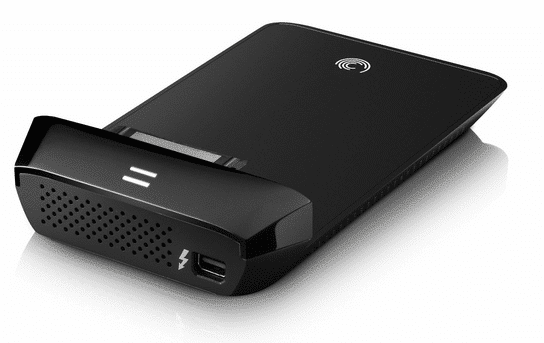
May 4, 2012
How To Create a “Work” Menu Like Office 2004/2008 in Microsoft Word 2011 for Mac
While I truly like Microsoft Office 2011 for Mac (you can see my review of it here on the Microsoft Office for Mac Blog), there are some folks who have complained about a feature being removed from previous versions, specifically, the “Work” menu that was present in previous versions of Word in Office for Mac (2004 & 2008). Personally, I…
Read more →
April 24, 2012
Get Those Cleaning Supplies Out & Roll Up Your Sleeves – How to Clean Your Digital Home!
It's Springtime! Leaves are appearing on the trees, the sun is starting to gain dominance over the rain, and my eyes are teary, not only from the pollen in the air, but also from the fact that I need to start doing my spring cleaning around the house! It's time to put away the winter clothes, coats and blankets, throw…
Read more →
April 9, 2012
Advanced Multimedia Storage & Streaming for your Home Network – Western Digital My Book Live Duo
Every time I write a blog post or an email or take a picture, I'm amazed at how something is created from literally nothing. It's so much different than when you wrote something on a piece of paper or took a photo to have it "printed" from film. In the past, we created physical object using the tools that we…
Read more →
March 14, 2012
Walking Through IBM’s New iPad Cloud Application
It's no surprise that I'm writing about clouds and iPads and applications. If you do a search on my site, you will see that I write about all 3 of these topics, just never at the same time. When I found out that IBM had produced a Cloud application, my interests were sparked for many reasons: 1) I helped produce…
Read more →
March 12, 2012
PocketFinder – A Cellular & GPS Locating Device That You Throw in a Bag and Start Tracking Your Loved Ones
Technology is really great sometimes. Not only have devices gotten smaller, they have become more powerful and more useful. Think about cell phones - do you remember the size of them back in the 80's? They were simply HUGE and clunky. GPS technology has gone the same way and are now so small, they can be integrated into a smartphone.…
Read more →
March 6, 2012
How Internet Security Savvy Are You?
If you have read any of my articles in the past, I find it extremely important to use technology as a tool to better your life. Some of those "tools" are for entertainment, and others are for security and safety of yourself and your family. Entertainment is obviously fun, as it should be, but security and safety is not as…
Read more →
January 23, 2012
iOS 5 Tip: Using Siri As A Spell Checker and Spelling Assistant – Spelling Test Results!
For a few months now, I have been using the iPhone 4S and enjoying the wonders of Siri. There have been literally thousands of posts on tips and tricks that you can do with Siri (and I'm sure the one that I'm about to mention has been covered in some form or another). For those of you hiding under an…
Read more →
November 29, 2011
How To Configure Location-Based Reminders on the iPhone with iOS5
I kept hearing about how with iOS 5, you could set up Reminders that would trigger when you arrived or left a particular location. It's a pretty neat concept. You can program in an address, like your work, and set up a series of to-dos that magically remind you when you are geographically near that location. Or perhaps, you are…
Read more →
October 17, 2011
iOS 5 Tips: Cell Data for Purchases, Custom Vibrations and Hourly Weather
Last week I talked about a few new tidbits and tricks in Apple's new version of its mobile operating system, iOS 5 (enable Emoji keyboard, get the camera button to appear in the lock screen and how to launch the new built-in dictionary). I have 3 more pretty cool little tips and tricks this time around, namely: cellular data for…
Read more →
October 14, 2011
iOS 5 Tip: How to Launch the New Built-in Dictionary on the iPhone or iPad
I keep uncovering lots of little surprises in Apple's new iOS 5 software released this week for the iPhone & iPad. Yesterday, it was the activation of the camera button on the iPhone's lock screen. This one is just as useful and is extremely helpful. Included in the OS is now a full-fledged dictionary (that even looks like the dictionary…
Read more →


