


Today I ran into a rather odd issue. All of a sudden, all of my Firefox buttons that were from 3rd party plugins were missing and could not be added via the “customize” option. Very weird!
I did a quick amount of research and saw that other manifestations could include:
- Bookmarks not saving properly
- Size and position of the browser windows are not “remembered” on next restart
- Strange toolbar behavior when relaunching (e.g., changes being lost)
It turns out that your local configuration information is stored in a file called the “localstore.rdf.” Problems like the ones described above happen when this file becomes corrupted. Why this happens, I don’t know.
Here is how to fix. There are two ways:
- Restart Firefox in “Safe Mode” & reset toolbars and controls
- Delete “localstore.rdf” by hand
It’s best to try step one first as it is a bit safer and won’t blow away your entire configuration file.
To launch Firefox in Safe Mode and reset your toolbars and controls:
- Exit out of Firefox.
- Launch Firefox in Safe Mode:
- [PC] Go to START > ALL PROGRAMS > MOZILLA FIREFOX folder and select “Mozilla Firefox (Safe Mode)”
- [Mac] Double click on the Firefox application icon while holding down the OPTION key
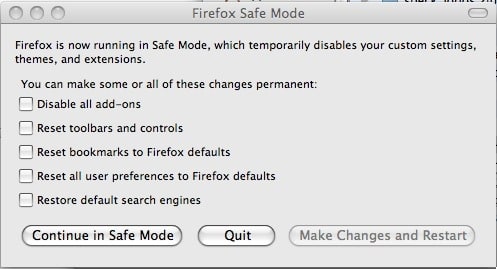
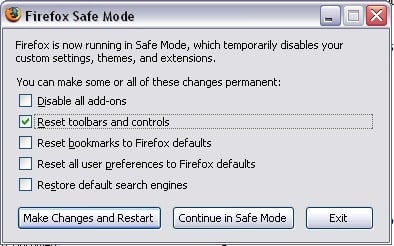
- If properly launched in Safe Mode, you will see the Safe Mode screen:


- Choose the “Reset toolbars and controls” option
- Click “Make Changes and Restart”
Deleting the “localstore.rdf” file:
This method requires that you delete the “localstore.rdf” file from your PROFILE directory. Be sure that you DO NOT delete a file by the same name that may exist within the program installation folder (PC only).
On a PC, this is located (typically) at:
c:\Documents and Settings\[USER]\Application Data\Mozilla\Firefox\Profiles\[CRYPTIC NAME].default\
On a Mac, this is usually located at:
[HARD DRIVE]:Users:[USER NAME]:Library:Application Support:Firefox:Profiles:[CRYPTIC NAME].default:
The “Cryptic Name” that I mention above is usually a string of letters and numbers. Find the file named “localstore.rdf” within that directory (it sometimes helps to sort the files by dates) and delete it. This will completely delete all of your toolbar preferences. The file will be automatically recreated when you relaunch Firefox.
When you restart Firefox after doing this reset, note that you will have all of your toolbars enabled and you may have to tweak some settings to get things back the way they were.
Did you find this solution useful? If so: [paypal-donation reference=”FireFox Toolbar fix”]
HTD Says: Hope this Firefox fix restores your toolbars. It worked for me.


9 comments
privacy protection virus
Thanks for your article! It’s very helpful for me!
air max shoes
Well , the view of the passage is totally correct ,your details is really reasonable and you guy give us valuable informative post, I totally agree the standpoint of upstairs. I often surfing on this forum when I m free and I find there are so much good information we can learn in this forum!
aesthetic-appeal
Scooby Doobie
Doesn't work for me but thanks anyways. Seems like maybe general Firefox problem but not sure. Tried downgrading from 3.6 to 3.5, 3.0.. disabled all add-ons and extensions, deleted config file a couple times, tried “restore default settings” several times, no luck. Mac 10.5.6 with FF 3.6. Found lots of other unsolved cases around the webs though so maybe FF working on fix. All my add-ons are still functional just no buttons available for them, and no custom tool bars definable. Oh well!
Cas Johnson
Fabulous! Mac version of the fix (to delete the localstore.rdf file) worked for me – thanks for saving my bacon! :)
Cas Johnson
Fabulous! Mac version of the fix (to delete the localstore.rdf file) worked for me – thanks for saving my bacon! :)
Shane
Man, I can't thank you enough for this. I had no clue what had happened to my toolbars, but Option 1 fixed it for me.
Thank you! Thank you! Thank you!
hightechdad
Glad that worked for you! Sometimes it doesn't always do it. I recently had to change themes for my wife's machine because her theme wasn't quite compatible with the version of Firefox she had.
You never know what it is until you try some things.
-HTD
Shane
Man, I can't thank you enough for this. I had no clue what had happened to my toolbars, but Option 1 fixed it for me.
Thank you! Thank you! Thank you!
hightechdad
Glad that worked for you! Sometimes it doesn't always do it. I recently had to change themes for my wife's machine because her theme wasn't quite compatible with the version of Firefox she had.You never know what it is until you try some things.-HTD