“Fix It” collection
Master the art of household maintenance with practical DIY repair guides for appliances, electronics, and software systems. These tutorials focus on cost-saving troubleshooting techniques and hands-on solutions to keep your home and gadgets running at peak performance.
June 10, 2009
Fixing Blank, Empty or White WordPress Pages after Upgrade
Just a few hours ago, WordPress 2.8 was release to the general public (for the self-hosted version). I was notified within my admin portal and, after I did a quick database backup and downloaded all of my blog's files, I clicked on the upgrade button. After a few seconds, WordPress told me that everything was successful. I was pretty amazed…
Read more →May 4, 2009
Honda Motors Defective Paint Job – Honda Accord’s Clear Coat Peeling
I'm typically not one to complain out things. Bad things happen and I frequently find it better to just look at the bight side of things. Sometimes this gets me into hot water though, as I miss opportunities to make things (including myself) better. To that end, I'm hoping that the end result of this negative blog post will result…
Read more →
April 9, 2009
Conficker Worm- What You Should Know, Prevention & Fixes
It looks like the Conficker worm is rearing its ugly head today, downloading a mysterious payload that is heavily encrypted to infected Windows machines. As the information on this is just starting to hit, there is still a lot of speculation as to what the payload contains and what it does. This post provides a brief rundown of links, tools…
Read more →
March 18, 2009
How to Move a WordPress Blog from One Domain/Host to Another
Over that last couple of days, I have had the "pleasure" of moving a blog from one hosting provider to another (not that difficult of a task) but ALSO changing domains in the process. While I don't think this post should the definitive set of instructions, it is a combination of information that I read and gathered, in conjunction with…
Read more →
February 24, 2009
Fix It: Safari 4 Beta Crash on Startup – Plug-in Issue
Today Apple released a beta version of Safari for both Macs and Pc's. I was very eager to try it out especially to see if it truly is "the world's fastest web browser." Also intriguing is the "coverflow-esque" feature, an eye candy pleaser. I downloaded the Mac-version beta from Apple and fired up the installer without much further thought. The…
Read more →
February 17, 2009
HTD Tech Tip #7: Fix Broken Firefox Toolbars
Today I ran into a rather odd issue. All of a sudden, all of my Firefox buttons that were from 3rd party plugins were missing and could not be added via the "customize" option. Very weird! I did a quick amount of research and saw that other manifestations could include: Bookmarks not saving properly Size and position of the browser…
Read more →
February 9, 2009
How to Easily Check your Blog for Security Breaches & Hacker Code
A few months ago, I got an email from a family member that told me that when they visited my blog, they received a "malicious software" warning. I found this very odd, since I visit my own blog fairly regularly and hadn't noticed anything out of the ordinary. I found out that the issue only appeared with Safari for the…
Read more →
December 28, 2008
Fix It: Opening Control Panel Crashes Windows Explorer on XP/Vista
Have you ever tried to open your Control Panel on Windows XP (or Vista) and every time that you attempted it, you received a “Windows Explorer has Stopped Working†message and your entire Windows environment loses all of its functionality? It can be very bothersome and extremely annoying. This happened to me the other day and there wasn’t a very…
Read more →
December 10, 2008
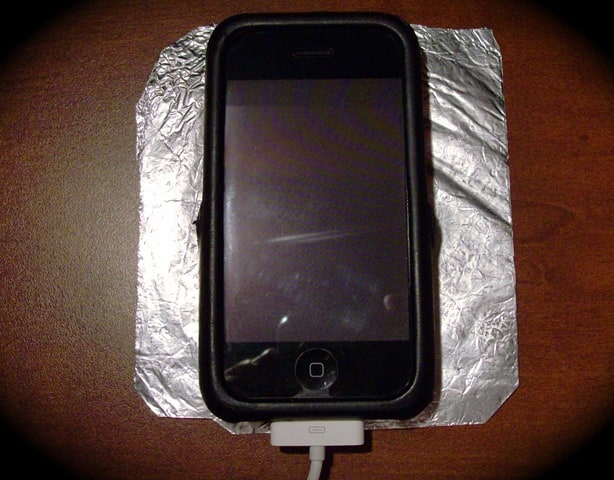
HTD Tech Tip #6: Putting your Cell Phone on Tinfoil Means No Speaker Interference
Have you ever heard the electronic buzzes and tones (called TDMA noise) that come from your computer speakers when your iPhone or other cellular phone is in close proximity? Typically this happens when your phone is downloading data or about to receive a call. It is EXTREMELY annoying. That is part of the reason why, if you use an FM…
Read more →
December 4, 2008
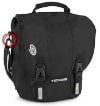
HTD Tech Tip #5: How to Stop Squeaking Computer Bags
I have a great computer bag, believe it or not, it is called "The Blogger" by Timbuk2, appropriate, right?. I have practically no complaints about it, with one BIG exception. It squeaks! When I walk, the hinge seems to rub back and forth, causing a grinding/squeaking noise. It is extremely annoying! You can see the hinge circled in red in…
Read more →
November 17, 2008
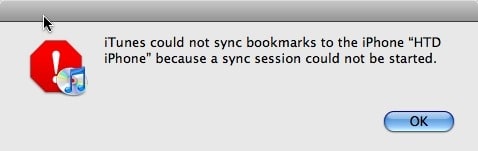
Fix-it: iPhone “Sync Session Could Not Be Started”
Well this past weekend I ran into a rather confusing problem which I did manage to resolve, however, I'm not sure exactly how I resolved it nor what really caused it. I have some ideas on both the cause and resolution so I will try to work through those here. This all came when I tried to sync my iPhone…
Read more →
November 12, 2008
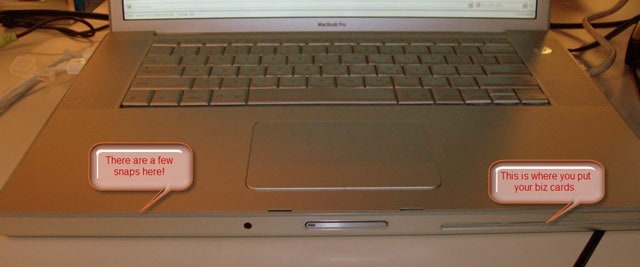
Tip: Snapping a MacBook Pro or PowerBook Upper Case Back Together
I have, over the years, cracked open a few PowerBooks and MacBook Pros, either to change a DVD drive or to upgrade the Hard Drive. My latest upgrade I did was to put a 320 GB Hard Drive in my MacBook Pro. I actually got pretty quick at it as I had to do it a couple of times. There…
Read more →