
“Tech” collection
Stay informed on the rapidly evolving world of consumer electronics, high-performance hardware, and digital innovation. This central tech hub provides a deep dive into the physical components and software ecosystems that power your modern life.
December 1, 2014
Drones, Beats and Radio Shack Means #GiftSmart Shopping
Who doesn’t like when holiday gifts arrive early! And normally, you just stick those gifts under the tree or save them to open at the appropriate time, but in this case, I needed to open the package right away. The funny thing is, I knew what the gift contained and who it was from. But that didn’t matter, I couldn’t…
Read more →
November 24, 2014
How to Fix Mac Office 2011 Crashing in Yosemite [UPDATED X3]
Recently, my version of Office for Mac (Office 2011), started crashing on my MacBook Pro. Every time I launched Word, Excel or PowerPoint, the app would crash after a few seconds with an error asking if I wanted to recover my work, reopen the Office app and send the error to Microsoft. It didn’t matter if I opened a document…
Read more →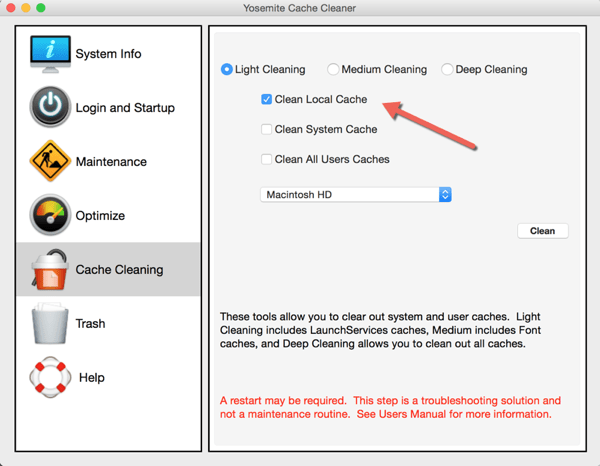
November 22, 2014
10 Tips for iPhone 6 and 6 Plus Users
When Apple releases new hardware and software, often times some of the newer features go un-noticed. People are generally used to doing things their own way…which is usually the “old” way. With the introduction of the iPhone 6 and 6 Plus recently, new chips and screen sizes have enabled new features for those lucky owners of the new iOS large…
Read more →
November 15, 2014
The Unu UltraPak Gives Fast Charging Power To Go
From tablets to smartphones to other digital gadgets, people’s biggest complaint is always batterylife. Until new battery technology comes in to play, you either have to always be in search of a plug or carry something that can provide you with a recharge on the go. There are lots of battery packs or cases out there (I have reviewed a few), but…
Read more →
October 23, 2014
13 Tips to Optimize Your Mac After Yosemite Installation [UPDATED]
As most of us know, Apple's latest operating system Yosemite (10.10), a free upgrade from Apple, is now available. And with it come a lot of nice new features, visuals and enhancements. But, as with any upgrade, there is always the possibility of having issues. While I had been running the Developer Preview on my MacBook Air and had not…
Read more →
October 10, 2014
Drowning out the Noise – iHome iB50 Noise Canceling Headphones
Someday, some creative inventor will design some noise canceling headphones that removes office conversations or screaming kids completely. Until then, we will have to survive with noise canceling headphone that simply remove droning background noise that happen in airplanes or on trains. I don't travel much, so I wasn't able to test this out on a plane, but I do…
Read more →
September 30, 2014
How to Fix iTunes Error 1723 When Syncing iPhone or iPad
I stumbled across an error when I was syncing my Apple iPhone 5S running on Apple's iOS 8 with iTunes on my Mac. It was an iTunes Error 1723. Apple errors are always a bit cryptic and sometimes require you to do some searching to find a solution. So, hopefully you found this article while searching for "how to fix…
Read more →
September 27, 2014
Parents Guide to Social Media Apps Used by Kids
I was recently asked by a reader of my site (Denise) if I could put together a chart that lists out some of the main social media sites used by tweens and teens and if I could provide some commentary on how they are dangerous (or not) for kids - essentially, a Parents Guide to Social Media apps used by…
Read more →
September 18, 2014
The Best Way to Install iOS 8 & Not Delete Apps & Data
Apple's iOS 8 has been released and people are complaining that they have to delete applications and/or data and media in order to install the new mobile operating system. This is true if you do an OTA (Over The Air) update. Sometimes, even connecting to iTunes on your computer and trying to do the upgrade there prevents you from doing…
Read more →
September 17, 2014
Direct Download Links for Apple iOS 8 & Prep and Install Tips [UPDATED]
Apple's newest version of their operating system (Apple iOS 8) for iPhones and iPads is now available. There are a few ways that you can update. You can plug your compatible iOS device (iPhone 4S and newer, iPod Touch 5th gen or iPad 2 or newer) into your computer and connect with iTunes and do the upgrade that way, you…
Read more →
September 11, 2014
How to Turn Off Facebook’s Auto-Play Videos & Save Data
If you are anything like me, you watch your cell phone's data consumption very closely. And given that I have 4 other people on my family shared plan (3 of them being teens & almost a teen), there are some apps that simply gulp down data. Tweens and teens absolutely LOVE image and video apps (think Instagram, Vine, SnapChat and…
Read more →
September 3, 2014
How To Change the Default Browser on Mac with Chrome Canary and Chrome
Google recently released a 64-bit version of its browser, Chrome Canary. If you want what Google calls "the bleeding edge of the web" type of browser, you can download and install Google Chrome Canary for Mac (or Windows). It has the latest features and is targeted towards early adopters, developers and the like. I had been using the beta channel…
Read more →


