


It has, once again, been a long time since my last post…I have now returned from vacation in Lake Tahoe and I can get back to things. I used my iPhone a lot on vacation but there was one critical thing that I could not figure out how to do.
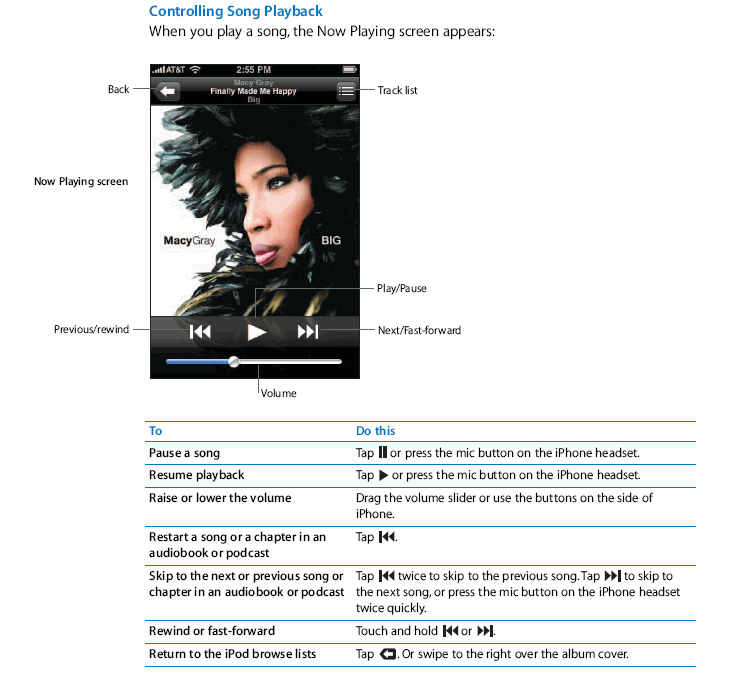
I guess that I should have RTFM-ed on this one, but low and behold, the answer WAS right there in the manual. It was pretty obvious how to skip songs when you are playing them, you just click on the |<< or >>| buttons. But what was not so obvious (at least to me) was how to fast forward and rewind within a song.
So, for those people who are still scratching their heads on how to do this, here is the incredibly easy answer (almost too obvious…I hate when that happens). Just touch and HOLD the |<< and >>| buttons to do the desired action…THAT’S IT! Geez, I could kick myself!
Here is a snapshot from the Apple iPhone User Manual:
Happy iPhoning!


2 comments
Dan
Much better way of doing it is when your playing the song in potrait mode, like the screen in the post above simply tap the screen anwhere in the middle and a slider bar will appear along with some other controls.
Dan
Much better way of doing it is when your playing the song in potrait mode, like the screen in the post above simply tap the screen anwhere in the middle and a slider bar will appear along with some other controls.