“Tech” collection
Stay informed on the rapidly evolving world of consumer electronics, high-performance hardware, and digital innovation. This central tech hub provides a deep dive into the physical components and software ecosystems that power your modern life.
January 6, 2009
Places to Track the Macworld 2009 Keynote Live
Below is a list of places that are tracking the Macworld 2009 Keynote: Engadget - http://www.engadget.com/2009/01/06/live-from-the-macworld-2009-keynote/ Gizmodo - http://live.gizmodo.com/ ArsTechnica - http://arstechnica.com/news.ars/post/20090106-macworld-ars-macworld-2009-keynote-live-on-ars.html (follow updates on Twitter - http://twitter.com/arsmacworld) MacRumors - http://www.macrumorslive.com/ TUAW (The Unofficial Apple Weblog) - http://www.tuaw.com/macworld2009/ (follow updates on Twitter - http://twitter.com/tuaw_mwsf09) Macworld - http://www.macworld.com/article/137730/2009/01/expo_live.html?lsrc=top_1 C|net - http://news.cnet.com/8301-13579_3-10131491-37.html (note, page will not be live until Keynote starts) iPhoneAlley…
Read more →
January 5, 2009
Ongoing Roundup of Macworld 2009 News, Products, Links, etc.
I will be at (or currently am at) Macworld 2009 this week. As you can see, they have been waiting for me (GRIN – see picture below). I'm hoping to visit quite a few vendors and see what new gadgets and technology are being announced. If you are a vendor, please contact me here. I will be on Twitter (@HighTechDad)…
Read more →
December 28, 2008
Fix It: Opening Control Panel Crashes Windows Explorer on XP/Vista
Have you ever tried to open your Control Panel on Windows XP (or Vista) and every time that you attempted it, you received a “Windows Explorer has Stopped Working†message and your entire Windows environment loses all of its functionality? It can be very bothersome and extremely annoying. This happened to me the other day and there wasn’t a very…
Read more →
December 16, 2008
HTD Twitter List: Gadgets for Under $100
I'm trying something new here. I am going to run a quick series where I will ask a question to the Twitter-verse and then will compile the answers in a list which I will call the "HTD Twitter List". The list will contain all of the recommendations (within reason) of products or services that people tweet to me, as well…
Read more →
December 12, 2008
Using Twitter is like Fishing
I'm an on and off fisherman, mainly fly fishing; I worked in a few fly fishing shops in my youth (gasp, I'm not THAT old, should I say "youth"?). Also, recently I installed Flick Fishing for the iPhone and have spent numerous hours on my commute trying to hook fish. Well, that go me thinking. Since part of my job…
Read more →
December 10, 2008
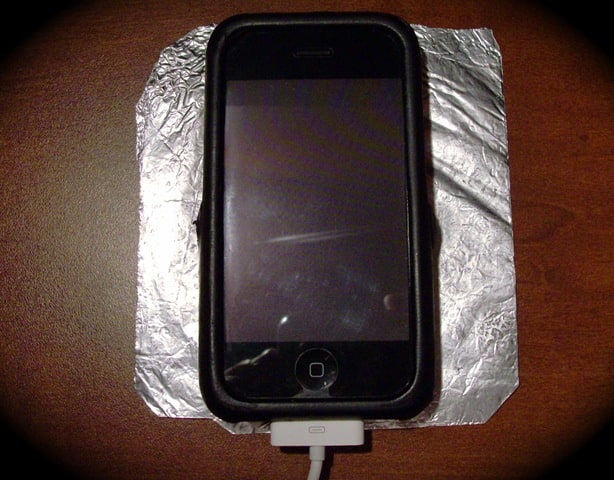
HTD Tech Tip #6: Putting your Cell Phone on Tinfoil Means No Speaker Interference
Have you ever heard the electronic buzzes and tones (called TDMA noise) that come from your computer speakers when your iPhone or other cellular phone is in close proximity? Typically this happens when your phone is downloading data or about to receive a call. It is EXTREMELY annoying. That is part of the reason why, if you use an FM…
Read more →
November 25, 2008
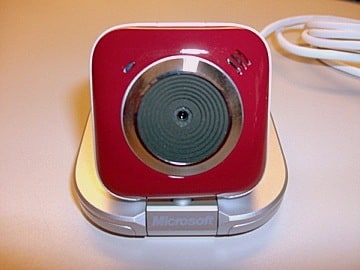
Microsoft and Family – LifeCam VX-5500 & Microsoft Office 2008
When you think about Microsoft, the first thing that comes to your mind is probably not Family. If you are like me, Microsoft software rules your computer at your office and runs the infrastructure there as well. Microsoft has done quite well in securing the business space from desktop productivity tools like Office to BackOffice systems that get your email…
Read more →
November 17, 2008
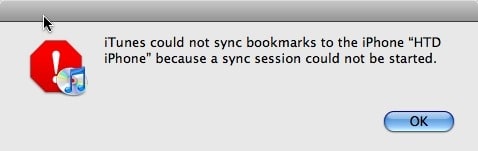
Fix-it: iPhone “Sync Session Could Not Be Started”
Well this past weekend I ran into a rather confusing problem which I did manage to resolve, however, I'm not sure exactly how I resolved it nor what really caused it. I have some ideas on both the cause and resolution so I will try to work through those here. This all came when I tried to sync my iPhone…
Read more →
November 12, 2008
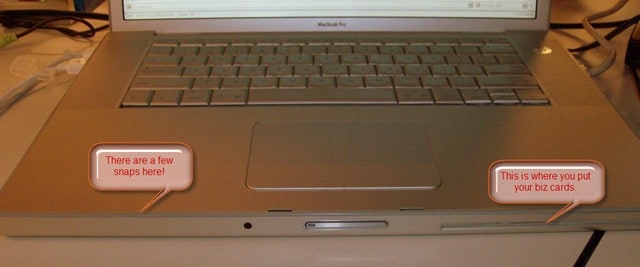
Tip: Snapping a MacBook Pro or PowerBook Upper Case Back Together
I have, over the years, cracked open a few PowerBooks and MacBook Pros, either to change a DVD drive or to upgrade the Hard Drive. My latest upgrade I did was to put a 320 GB Hard Drive in my MacBook Pro. I actually got pretty quick at it as I had to do it a couple of times. There…
Read more →
November 10, 2008
HTD Tech Tip #4: How to Organize Tech Manuals and Documents
Have you ever been searching for a receipt for some sort of a gadget or tech device that you purchased? What about trying to remember what was covered under the warrantee? And if you are like me, you have manuals stored in random drawers or bookcases. Do you even know where that big screen TV manual is at? Nowadays, with…
Read more →
November 7, 2008
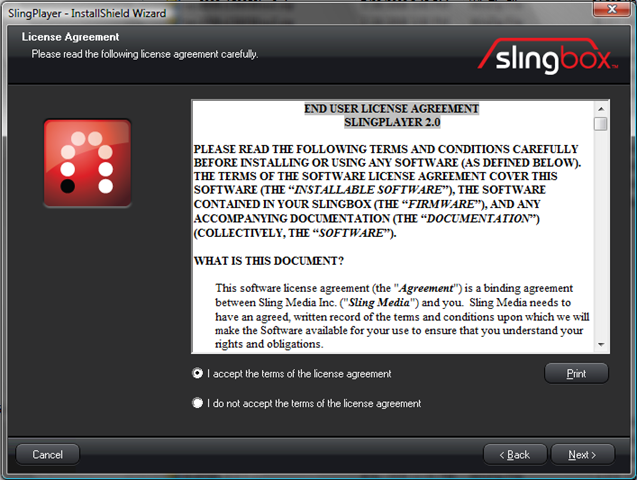
Slingbox PRO-HD: Initial Setup
So by now you have gone through the Slingbox Pre-installation tasks of setting up your network (wired, wireless or over the powerlines) and you have checked through the box to be sure that you know what connectors you need and how to use them. Let's take a look at the steps of setting up and configuring your Slingbox PRO-HD for…
Read more →
November 4, 2008
HTD Tech Tip #3: Security Programs Don’t Always Play Well Together
It's always important, if not critical to have anti-virus & security programs installed on your PC. I'm actually a big fan of the various Security Suites that you can get that come with all of the different types of protection packaged together (firewall, anti-virus, ant-spyware, anti-malware, anti-spam, etc.). With the all-in-one package, you don't have to worry about compatibility. There…
Read more →